
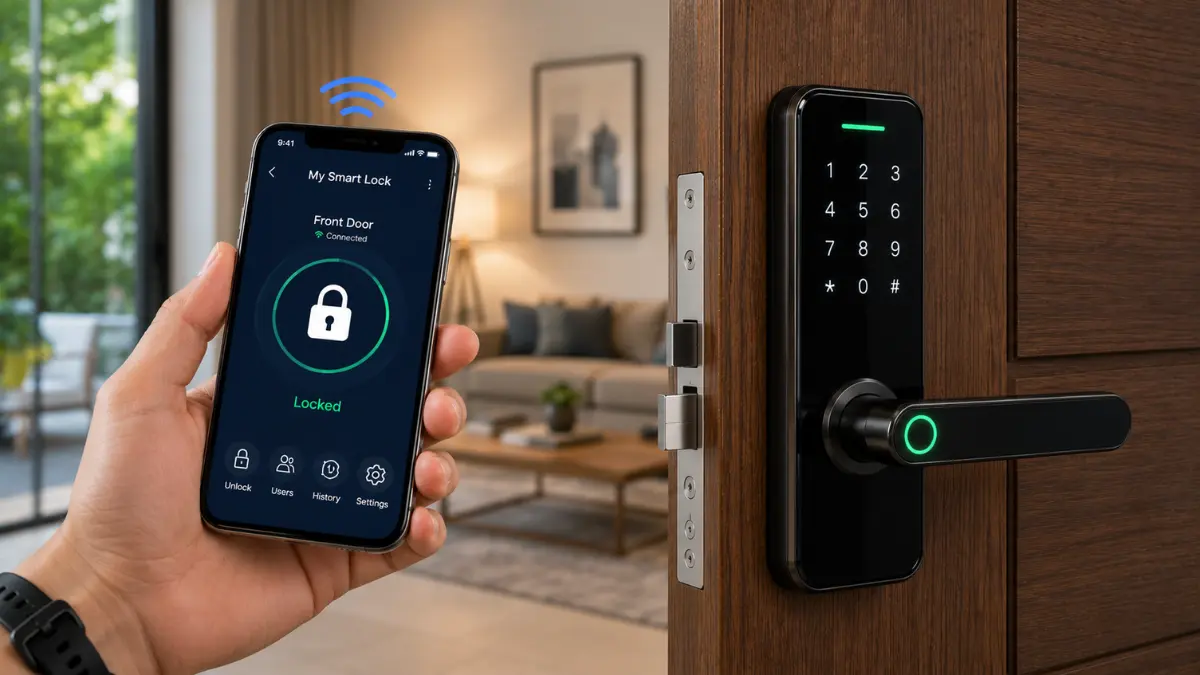
Smart locks are changing how people secure and access homes, apartments, offices, and other properties. Unlike traditional locks that rely primarily on a physical key, smart locks can use methods such as PIN codes, fingerprints, RFID/NFC credentials, smartphones, and other electronic authentication methods to control access.
However, choosing a smart lock is not simply about selecting the model with the most features. A smart lock that works well on one door may not be suitable for another because of differences in door material, door thickness, existing lock mechanism, installation requirements, connectivity, power supply, and security needs.
Smart locks also introduce considerations that traditional locks do not have, including battery failure, electronic or connectivity problems, account security, software support, and privacy.
In this guide, you’ll learn how smart locks work, the different types and locking mechanisms, how to check whether a smart lock is compatible with your door, how to evaluate its security and connectivity, what happens when something goes wrong, and what to consider before buying one.
A smart lock is an electronically controlled door lock that allows you to lock or unlock a door without relying only on a traditional key. Depending on the model, access may be provided through a PIN code, fingerprint, RFID/NFC credential, smartphone, Bluetooth, Wi-Fi, or another supported authentication method.
Before buying a smart lock, check its door compatibility, existing lock mechanism, authentication methods, connectivity, battery life, emergency access, installation requirements, and security features.
Key Takeaway: A smart lock is not automatically more secure simply because it is electronic or connected. Real-world security depends on the lock mechanism, door and frame, authentication, power-failure protection, installation, and how the system is used and maintained.
What Is a Smart Lock?
A smart lock is an electronically controlled locking system that allows a door to be locked or unlocked using digital or electronic authentication methods rather than relying only on a traditional physical key.
Depending on the model, access may be provided through a PIN or keypad code, fingerprint, RFID/NFC credential, smartphone, Bluetooth, Wi-Fi, or another supported authentication method. Some smart locks may also provide features such as temporary access credentials, activity logs, automatic locking, remote control, and smart-home integration.
The electronic features are only one part of the system. A smart lock also relies on a physical locking mechanism that secures the door. Its real-world security therefore depends on the quality of the lock mechanism, door and frame, authentication system, installation, power supply, and how the system is configured and used.
Key Takeaway: A smart lock combines electronic authentication and control with a physical locking mechanism. The electronic features determine how access is authorized, while the physical lock, door, frame, installation, and overall security setup determine how effectively the door is protected.
Smart Lock vs Traditional Lock
A traditional lock normally relies on a physical key to operate its mechanical locking mechanism. A smart lock adds electronic authentication and control, allowing access through methods such as a PIN, fingerprint, RFID/NFC credential, or smartphone, depending on the model.
If you are deciding between the two, see our Smart Lock vs Traditional Lock guide for a detailed comparison of security, convenience, cost, reliability, access control, privacy, and emergency considerations.
| Feature | Smart Lock | Traditional Lock |
|---|---|---|
| Primary access | PIN, fingerprint, smartphone, RFID/NFC, physical key, or other supported methods | Usually a physical key |
| Battery | Usually requires a power source, commonly batteries | Does not require electrical power |
| Remote control | Available on some models, usually through a compatible network or hub | Generally not available |
| Access management | Can support multiple users, temporary credentials, or scheduled access | Usually depends on physical key distribution |
| Activity logs | Available on some models | Generally unavailable |
| Failure considerations | May involve battery, electronic, connectivity, software, and mechanical components | Primarily mechanical components |
Neither type is automatically more secure in every situation. A smart lock can provide additional convenience and access-control capabilities, but it also introduces electronic components and additional potential failure points. The quality of the physical lock, door, frame, installation, authentication system, and overall security design still matters.
What Makes a Lock “Smart”?
A lock can be considered “smart” when electronic authentication and programmable control are integrated with its physical locking mechanism. The system can verify an authorized credential and then control the locking mechanism according to its configuration.
Depending on the product, smart functionality may include fingerprint recognition, PIN codes, RFID/NFC credentials, smartphone control, Bluetooth, Wi-Fi, automatic locking, access logs, user management, or integration with a smart-home platform.
A smartphone app or electronic keypad alone does not necessarily define how “smart” a lock is. Products vary considerably in their capabilities, so the actual authentication methods, control features, connectivity, emergency access options, and physical locking mechanism should be evaluated rather than relying only on the product’s marketing name.
Smart Lock, Digital Lock and Electronic Lock: What’s the Difference?
These terms are often used interchangeably, but they can describe different levels of functionality. A digital lock may use a PIN, fingerprint, RFID card, or another electronic authentication method instead of a traditional key. An electronic lock is a broader term for a locking system that uses electrical or electronic control.
A smart lock generally adds programmable access control or intelligent features such as smartphone control, user management, access notifications, automation, activity history, or integration with a smart-home ecosystem. However, internet connectivity is not necessarily required for a lock to provide smart functionality, and the exact capabilities vary by product.
Note: The terms smart lock, digital lock, and electronic lock are not used consistently across the market. Always evaluate the actual access methods, connectivity, locking mechanism, emergency access, user-management features, and security characteristics rather than relying on the product name alone.
How Do Smart Locks Work?
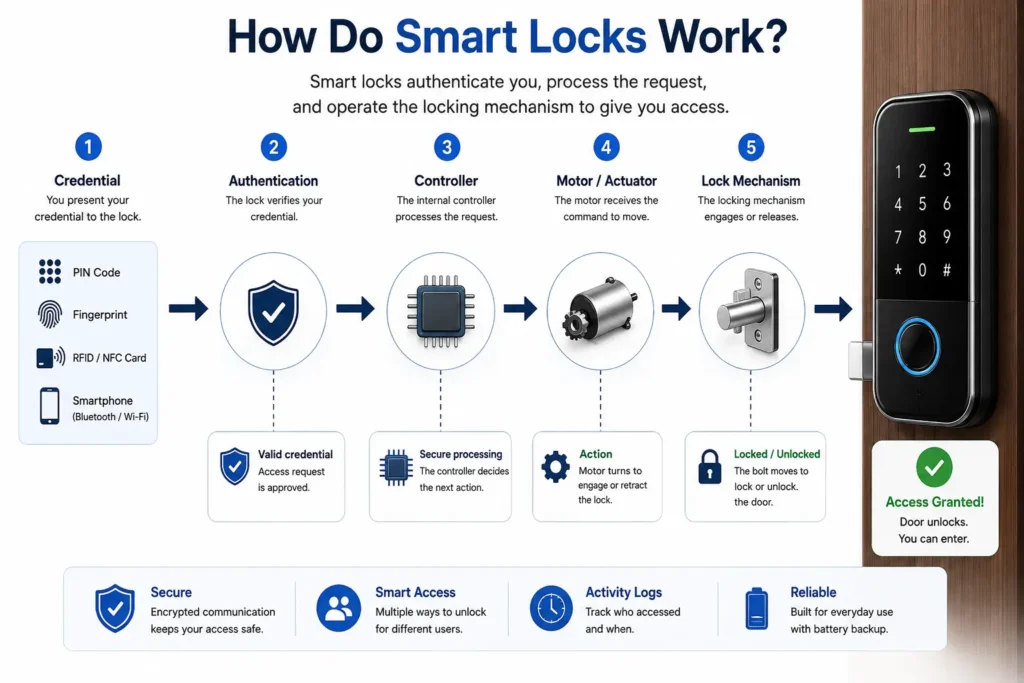
A smart lock works by combining an electronic authentication system with a physical locking mechanism. When a user presents an accepted credential—such as a PIN, fingerprint, RFID/NFC credential, smartphone, or another supported method—the lock verifies the credential and, if authorized, activates an internal motor, actuator, or other mechanism to operate the lock.
The exact technology varies between products, but the basic access process can be understood as:
Credential → Authentication → Controller → Motor/Actuator → Lock Mechanism
The electronic system determines whether access should be authorized, while the physical locking mechanism performs the actual locking or unlocking. Because the electronic components and motorized mechanism depend on power, smart lock battery life is also an important part of everyday smart-lock operation.
What Happens When You Enter a PIN?
When you enter a PIN on a smart lock’s keypad, the lock processes the entered code and compares it with the credentials stored or managed by the system. If the PIN is valid and authorized, the electronic controller sends a command to the locking mechanism to release or operate the lock.
Depending on the model, the lock may also support individual user PINs, temporary or scheduled credentials, failed-attempt protection, alerts, or access logs.
Tip: If a smart lock supports multiple user PINs, create separate credentials instead of sharing one permanent code. This makes it easier to revoke or change access when a user no longer needs entry.
How Fingerprint Authentication Works
A fingerprint smart lock uses a fingerprint sensor to capture fingerprint characteristics and compare them with an enrolled fingerprint credential. If the system determines that the presented fingerprint matches an authorized credential, it can allow the lock to operate.
Fingerprint performance can vary depending on the sensor technology, enrollment quality, finger condition, environmental conditions, and the design of the particular product. A smart lock using fingerprint authentication should therefore provide a reliable alternative such as a PIN, RFID credential, smartphone access, or mechanical/emergency override.
How Smartphone Access Works
Some smart locks allow a smartphone to communicate with or control the lock through a manufacturer’s application. Depending on the product, communication may use Bluetooth, Wi-Fi, or another supported communication method.
Smartphone-based systems may provide features such as user management, temporary access, notifications, access history, automation, or remote control. However, the available functions depend on the lock, communication method, application, and whether an internet connection or additional hub is required.
Note: Bluetooth access and internet-based remote access are different functions. A smart lock may support local smartphone access over Bluetooth while remote control requires an internet-connected hub, bridge, or built-in Wi-Fi connection.
Where Bluetooth and Wi-Fi Fit In
Bluetooth is commonly used for short-range communication between a smartphone and a compatible smart lock. It can provide local access when the user is near the door and does not necessarily require the lock itself to have a direct internet connection.
Wi-Fi can connect a compatible smart lock to a home network and, depending on the product architecture, support functions such as remote access, notifications, or integration with online services. Some locks use a separate hub or bridge instead of having built-in Wi-Fi.
The communication architecture varies between products. Before buying, check whether the functions you need—such as remote unlocking, notifications, voice-assistant integration, smartphone access, or local operation—require Bluetooth, Wi-Fi, a hub or bridge, or an internet connection.
Smart Lock Anatomy: What Is Inside a Smart Lock?
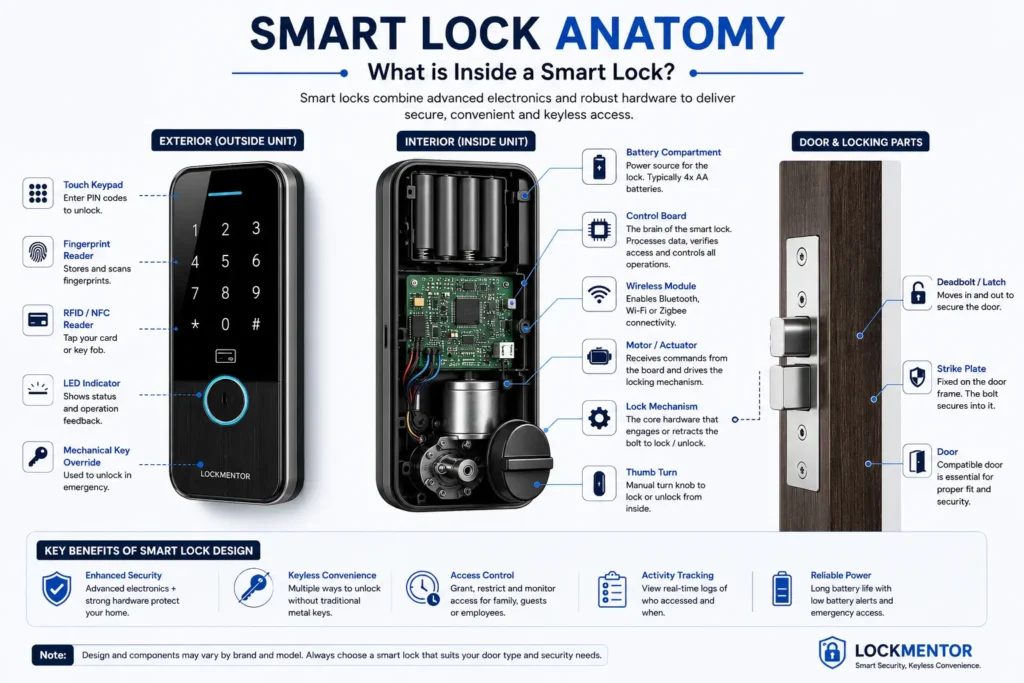
A smart lock is not a single electronic component. It combines electronic authentication, control electronics, power, communication technology, and a physical locking mechanism. Understanding these components helps you compare smart locks based on how they actually work rather than simply comparing feature lists.
The exact design varies between products. Some smart locks replace or integrate with the complete locking mechanism, while others are retrofit devices that operate an existing lock. However, most systems contain several core components that work together to control access.
Lock Body and Bolt
The lock body contains the physical mechanism that keeps the door secured. Depending on the design, this may include a deadbolt, latch, mortise mechanism, cylinder-based mechanism, or another locking arrangement.
When access is authorized, an internal motor or actuator operates the mechanism so that the bolt or latch can move. The physical strength and design of this mechanism remain important because electronic access control does not replace the underlying mechanical security of the door.
Credential Reader
The credential reader or input system is the part of the smart lock that receives or detects the user’s authentication method. Depending on the model, this may be a fingerprint sensor, keypad, RFID/NFC reader, smartphone connection, or another supported authentication interface.
Different authentication methods provide different combinations of convenience, accessibility, and security. A smart lock may also support multiple authentication methods so users have an alternative when their preferred method is unavailable.
Motor and Actuator
After the system verifies an authorized credential, the controller can activate a motor or actuator. This converts the electronic command into physical movement that operates the locking mechanism.
The motor and gearbox must provide sufficient movement and force for the particular lock design. Proper installation and alignment are also important because excessive friction, door pressure, or a misaligned door can affect how smoothly the mechanism operates.
Battery and Power System
Most electronic smart locks require a power source to operate their electronic components and motor. Depending on the product, this may be provided by replaceable batteries, rechargeable batteries, or another manufacturer-specified power arrangement.
Because electronic access depends on power, a smart lock should provide a clearly understood low-battery warning and emergency access method. The available backup method varies by product and may include an external emergency power connection, mechanical key, or another manufacturer-supported option.
Tip: Before buying a smart lock, find out exactly how the lock can be opened when its primary battery is completely depleted. Do not assume that every smart lock provides the same emergency backup method.
Connectivity and Communication Module
Some smart locks contain communication hardware that allows them to communicate with smartphones, hubs, home networks, or smart-home platforms. Depending on the model, this may include Bluetooth, Wi-Fi, or other supported communication technologies.
Communication capabilities determine which connected features are possible. For example, Bluetooth may support local smartphone access, while a compatible Wi-Fi architecture can enable additional network-based features such as remote access or notifications.
Mechanical Override
Some smart locks include a mechanical key or another physical override that can be used when electronic access is unavailable. Other products use an emergency electronic power method or a combination of backup mechanisms.
The presence and design of an emergency override can be important when evaluating battery failure, electronic malfunction, or other unexpected situations. Always check the manufacturer’s instructions to understand how the specific model handles emergency access.
Authentication Method vs Lock Mechanism: Why the Difference Matters
One of the most important things to understand when comparing smart locks is that the way you authenticate is not the same thing as the mechanism that physically locks the door.
Think of it this way:
Fingerprint, PIN, RFID/NFC, or smartphone = How the system identifies or authorizes the user.
Mortise, rim, deadbolt, cylinder, or another mechanism = How the door is physically secured.
This distinction is important when choosing a smart lock because a fingerprint-enabled lock is not automatically suitable for every door. The authentication technology may be effective, but the physical locking mechanism still needs to be compatible with the door, frame, and existing hardware.
Types of Smart Locks
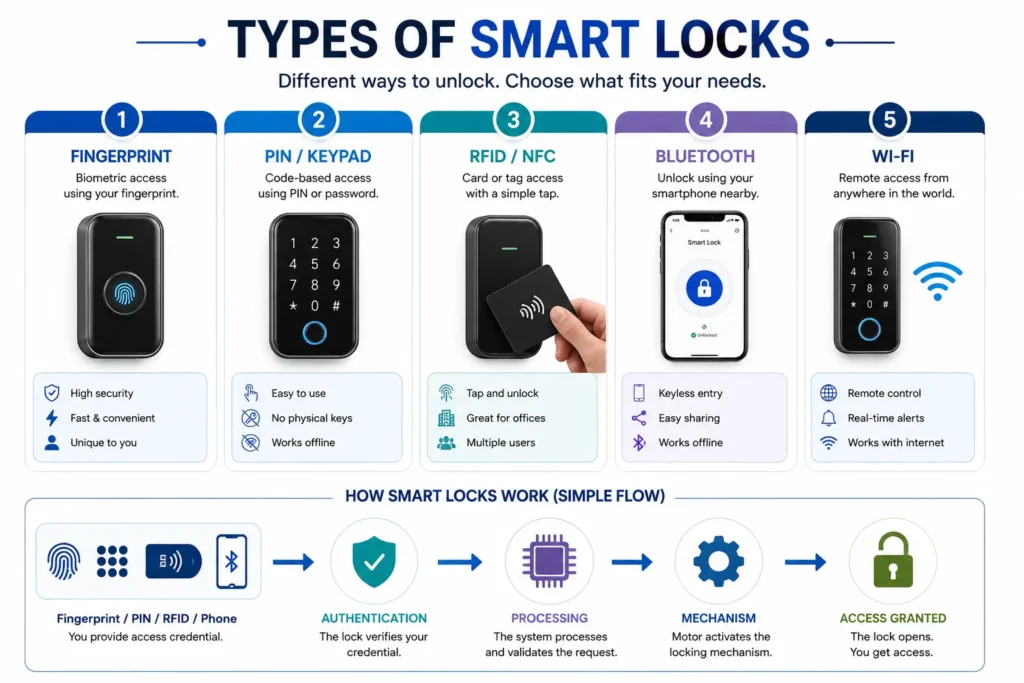
Smart locks can be classified in different ways based on how users authenticate themselves, how the lock communicates, and how it is designed to operate the physical locking mechanism. These categories can overlap, so one smart lock may use several technologies at the same time—for example, a mortise lock with fingerprint, PIN, Bluetooth, and Wi-Fi access.
Understanding these categories helps you compare smart locks based on the features and access methods you actually need rather than simply choosing a product with the longest feature list.
Fingerprint Smart Locks
Fingerprint smart locks use a biometric sensor to authenticate an enrolled user’s fingerprint. This allows authorized users to unlock the door without carrying a physical key or remembering a PIN.
Fingerprint authentication can be convenient for households with multiple users, but recognition performance may vary depending on the sensor technology, enrollment quality, finger condition, and environmental conditions. A reliable alternative access method, such as a PIN, RFID credential, smartphone, or mechanical/emergency override, can therefore be useful.
Fingerprint authentication is a form of biometric authentication. When evaluating a biometric smart lock, consider both recognition reliability and how the manufacturer handles biometric information.
Keypad and PIN Smart Locks
Keypad smart locks allow users to enter a programmed PIN or access code to unlock the door. Depending on the model, the system may support multiple user codes, temporary credentials, scheduled access, failed-attempt protection, or activity records.
PIN-based access can be useful when several people need entry because access codes can be created, changed, or revoked without physically distributing keys. However, users should avoid easily guessed codes and should follow the manufacturer’s recommendations for credential management.
RFID and NFC Smart Locks
RFID-based smart locks use compatible cards, tags, or key fobs as credentials. NFC-enabled systems can use supported near-field communication devices or credentials for access.
These systems can be convenient for homes, offices, hotels, and other environments where controlled credential distribution is useful. The exact technology, credential format, operating range, and supported devices vary by product.
Smartphone and App-Enabled Smart Locks
Smartphone and app-enabled smart locks allow users to manage or access the lock through a compatible mobile application. Depending on the model, the app may provide features such as locking and unlocking, user management, temporary access, notifications, access history, automation, and settings management.
The communication method may involve Bluetooth, Wi-Fi, a hub, or a combination of technologies. Before buying, check whether important functions work locally or require an internet connection and whether the manufacturer continues to provide software and security updates.
Bluetooth Smart Locks
Bluetooth smart locks can communicate with a compatible smartphone or other nearby device over Bluetooth. This can provide convenient local access without requiring the lock itself to have a direct Wi-Fi connection.
Bluetooth is generally most useful when the user is physically near the door. Features such as remote access or internet-based notifications may require additional hardware, connectivity, or a manufacturer-supported service.
Wi-Fi Smart Locks
Wi-Fi-enabled smart locks can connect to a compatible network and may support features such as remote access, notifications, cloud-based services, and smart-home integration, depending on the product.
Wi-Fi connectivity can provide additional functionality, but it may also introduce greater dependence on network configuration, software services, and power consumption. Before buying, check which features continue to work when the internet or home network is unavailable.
Camera-Integrated Smart Locks
Some smart entry systems combine a locking mechanism with a camera or video-doorbell-style functionality. This can allow users to see or interact with visitors while also controlling access to the door.
Because cameras introduce additional privacy and data-security considerations, buyers should evaluate video storage, access controls, cloud services, retention policies, and whether local storage is available.
Smart Lock Type Comparison
| Type | Main Advantage | Important Consideration | Best Suited For |
|---|---|---|---|
| Fingerprint | Keyless biometric access | Recognition reliability and backup access | Homes and frequent users |
| PIN / Keypad | Easy credential sharing and management | PIN security and management | Families and shared access |
| RFID / NFC | Simple credential-based access | Credential compatibility and management | Homes, offices, and controlled access |
| Smartphone / App | Convenient access and user management | Phone, software, and account dependence | Smart-home users and shared access |
| Bluetooth | Convenient local smartphone access | Short-range communication | Users who access the door with a phone |
| Wi-Fi | Potential remote connectivity | Network and service dependence | Connected homes and remote access |
| Camera-integrated | Access control plus visual monitoring | Privacy and video-data management | Smart entry and visitor monitoring |
Note: These categories can overlap. A single smart lock can combine several access and communication technologies—for example, a mortise lock with fingerprint, PIN, Bluetooth, and Wi-Fi. Therefore, evaluate the authentication method, communication technology, and physical locking mechanism separately when comparing products.
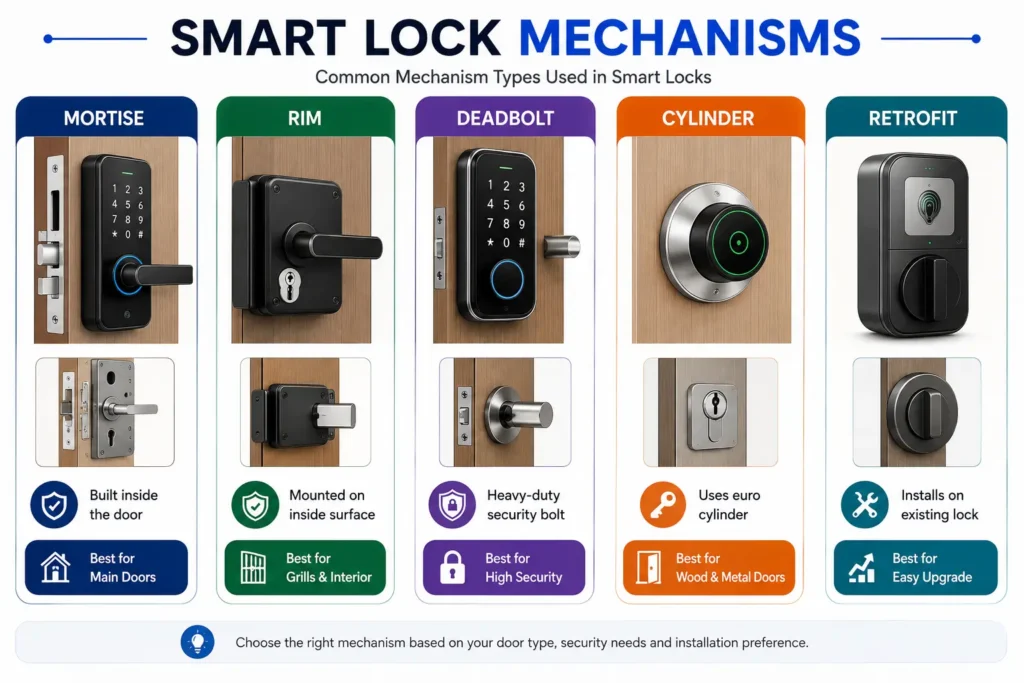
Smart Lock Mechanisms: Mortise, Rim, Deadbolt and Retrofit
Smart locks are not all built around the same physical locking arrangement. Depending on the product, a smart lock may use a mortise, rim, deadbolt, cylinder-based mechanism, or a retrofit design that operates compatible existing hardware.
This distinction is important because a smart lock that works well on one door may not be compatible with another. Before choosing a model, identify the existing lock mechanism, door dimensions, backset or cylinder configuration where applicable, available space, and installation requirements.
Mortise Smart Locks
A mortise lock is installed into a pocket, or mortise, cut into the edge of the door. A mortise smart lock integrates electronic access control with a mortise-based locking mechanism.
Mortise smart locks are commonly used where the complete lock body is designed to fit inside the door. Depending on the model, they may support different authentication methods and electronic features.
Note: Mortise smart locks require compatibility between the lock body and the door’s existing cut-out, dimensions, hardware, and available installation space. Do not assume that every mortise smart lock will fit every mortise door.
Rim Smart Locks
A rim lock is mounted on the surface of the door rather than being installed entirely within the door edge. Rim-style smart locks can therefore have different fitting requirements from mortise and deadbolt systems.
When considering a rim smart lock, check the existing rim mechanism, door thickness, mounting position, door-frame alignment, and the space available on both sides of the door.
Deadbolt Smart Locks
A deadbolt smart lock uses a deadbolt mechanism to secure the door. Depending on the design, a smart deadbolt may replace an existing deadbolt or operate it through a compatible retrofit mechanism.
Compatibility should be checked carefully, including the deadbolt dimensions, backset, door thickness, cylinder configuration where applicable, and available installation space.
Tip: If you are replacing an existing deadbolt with a smart lock, compare the manufacturer’s compatibility requirements with your current deadbolt before purchasing the product.
Cylinder-Based Smart Locks
Some smart locks are designed around a cylinder-based locking system. Depending on the product and regional hardware configuration, the smart component may replace the cylinder, operate the existing cylinder, or form part of a complete lock assembly.
Cylinder dimensions, profile, door thickness, and the existing hardware configuration can affect compatibility. Always check the manufacturer’s fitting requirements rather than choosing a product based only on the cylinder’s name.
Retrofit Smart Locks
A retrofit smart lock is designed to add electronic access and smart functionality to compatible existing locking hardware without necessarily replacing the entire lock assembly.
Retrofit systems can be useful when users want smart functionality while retaining part of their existing lock. However, compatibility depends heavily on the existing lock, cylinder or mechanism, door dimensions, and the way the retrofit device operates the locking mechanism.
A compatible retrofit system may require fewer physical changes to the door than a complete lock replacement. The actual installation requirements vary by product and should always be checked before purchase.
Full Lock Replacement vs Retrofit
| Factor | Full Lock Replacement | Retrofit Smart Lock |
|---|---|---|
| Existing hardware | Usually replaced or substantially modified | Part of the existing hardware may remain |
| Installation | May require more extensive fitting | May require fewer physical changes |
| Compatibility | Depends on the new lock’s dimensions and door requirements | Strongly depends on the existing lock configuration |
| Best consideration | Complete upgrade or new installation | Adding smart functionality to compatible existing hardware |
Key Takeaway: Choosing a smart lock starts with identifying the physical locking mechanism and door configuration. Fingerprint, PIN, RFID, and smartphone describe authentication methods, while Bluetooth and Wi-Fi describe communication technologies. Mortise, rim, deadbolt, cylinder-based, and retrofit describe how the smart lock is fitted to or operates the door’s physical locking system.
How to Know if a Smart Lock Fits Your Door
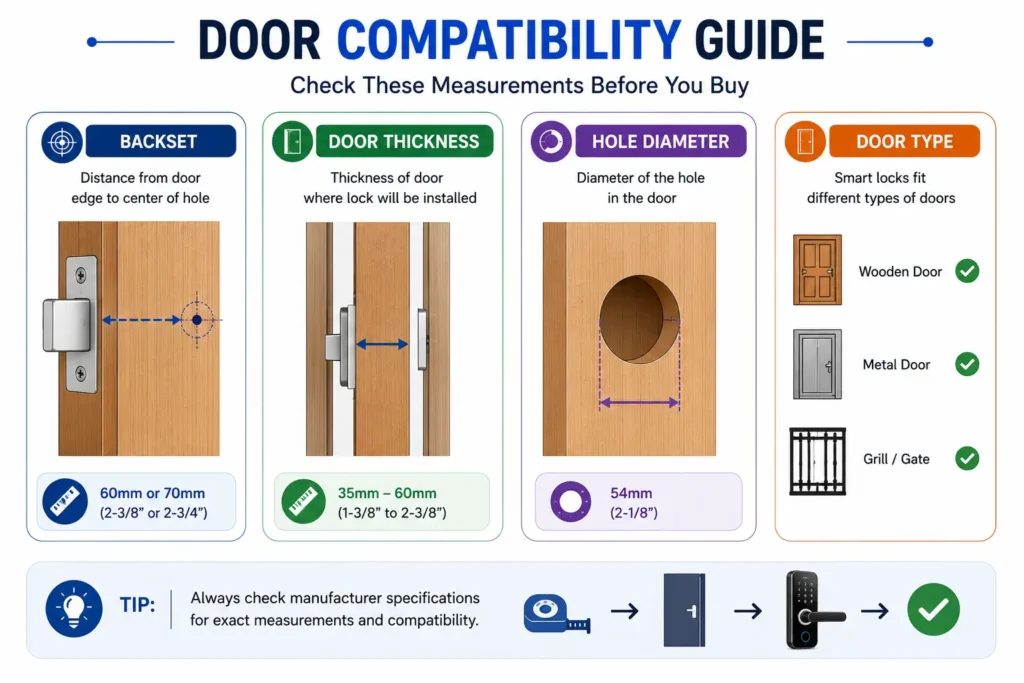
Not every smart lock will fit every door. Before buying one, check the door material and construction, door thickness, existing lock mechanism, lock dimensions, backset, door handing, frame alignment, and available installation space.
A smart lock may have excellent features, but if its physical dimensions or locking mechanism are incompatible with your door, it may require additional hardware, modification, or a completely different lock design.
Key Takeaway: Before comparing smart-lock features, first confirm that the lock is physically compatible with your door and existing hardware.
Check the Door Material and Construction
Smart locks can be designed for different types of doors, but compatibility depends on the particular product and the construction of the door. Common door materials include wood, metal, glass, composite, and other engineered materials.
The door material and construction can affect the available mounting method, structural support, drilling requirements, and the type of locking mechanism that can be installed. Always check the manufacturer’s installation requirements for the specific door.
Check the Door Thickness
Door thickness is one of the most important measurements to check before buying a smart lock. A lock designed for a particular thickness range may not install correctly on a door that is too thin or too thick.
Measure the actual thickness of the door at the location where the lock will be installed and compare it with the manufacturer’s specified compatibility range.
Identify the Existing Lock Type
Look at the lock already installed on the door before choosing a replacement or retrofit smart lock. It may use a mortise, rim, deadbolt, cylinder-based, latch, or another locking arrangement.
The existing mechanism can determine whether you need a complete replacement, a compatible retrofit device, or a different type of smart lock altogether.
Tip: Take clear photographs of the existing lock from the inside, outside, and door edge before shopping for a smart lock. These images can help you compare the existing hardware with the manufacturer’s compatibility and installation requirements.
Check the Backset and Lock Dimensions
The backset generally refers to the distance from the door edge to the centerline of the lock or related hardware. Depending on the lock design, other measurements such as the lock-body dimensions, spindle position, cylinder dimensions, and mounting-hole locations may also matter.
These measurements are especially important when replacing an existing lock or installing a smart lock designed for a specific hardware configuration.
Do not rely on the appearance of the existing lock alone. Compare the actual measurements with the smart lock’s official compatibility specifications.
Check Door Handing and Swing
Some locking mechanisms and installation designs may depend on whether the door is left-handed or right-handed and whether it opens inward or outward.
Before installation, check the manufacturer’s instructions to determine whether the smart lock supports your door orientation and whether any configuration, calibration, or installation adjustment is required.
Check Door and Frame Alignment
A smart lock’s motor or actuator needs to operate the locking mechanism without excessive resistance. If the door is sagging, the latch or bolt is misaligned, or the frame is damaged, the lock may experience unnecessary mechanical resistance.
Correcting the underlying door or frame problem may therefore be necessary before installing a motorized smart lock. A smart lock should not be expected to compensate for a poorly aligned door.
Note: If your existing door requires significant force to lock or unlock manually, resolve that mechanical problem before installing a motorized smart lock.
Check Indoor vs Outdoor Installation
A smart lock designed for an interior door may not be suitable for direct outdoor exposure. If the lock will be exposed to rain, humidity, dust, temperature changes, or direct sunlight, check the manufacturer’s environmental and installation specifications.
Do not assume that a lock is outdoor-ready simply because it has electronic or smart features. The product’s documented environmental protection and intended installation location should be considered.
Smart Lock Compatibility Checklist
| What to Check | Why It Matters |
|---|---|
| Door material and construction | Determines suitable mounting and installation methods |
| Door thickness | Must fall within the lock’s supported range |
| Existing lock type | Determines replacement or retrofit compatibility |
| Backset | Important for correct lock positioning |
| Lock-body dimensions | Ensures the new mechanism can physically fit |
| Door handing and swing | May affect installation and configuration |
| Door/frame alignment | Reduces unnecessary resistance on the mechanism |
| Available installation space | Needed for the interior and exterior components |
| Environmental exposure | Important for outdoor or exposed installations |
| Emergency access | Helps ensure access remains possible during electronic failure |
Are Smart Locks Safe?
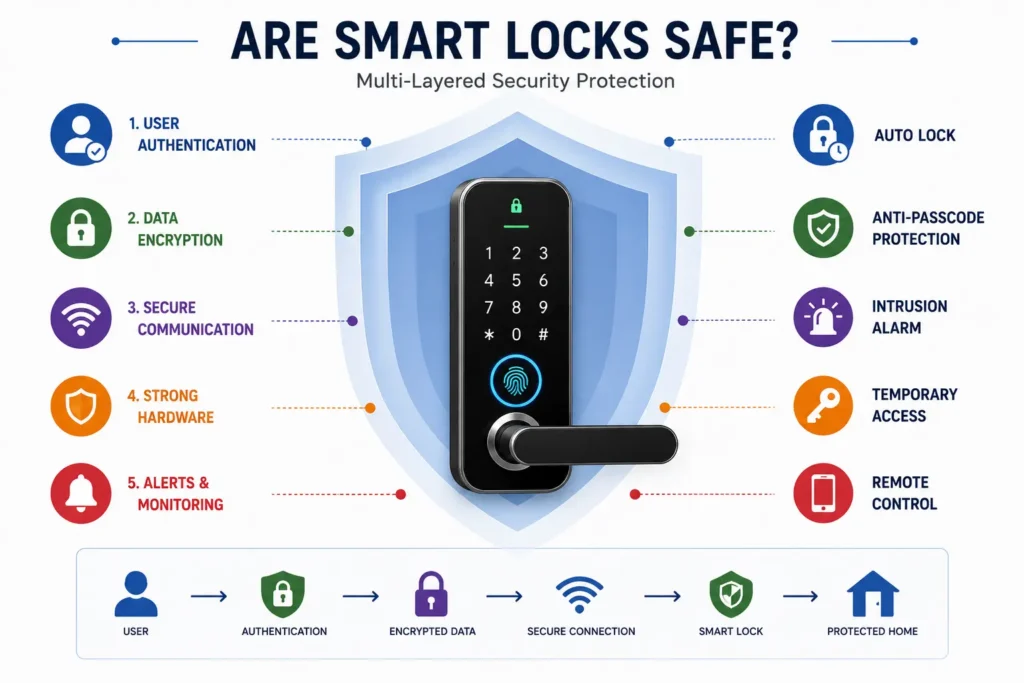
Smart locks can provide convenient and flexible access control, but being “smart” does not automatically make a lock more secure than a traditional lock. Real-world security depends on several parts working together, including the physical locking mechanism, door and frame, authentication system, electronic security, installation, power protection, and how the lock is used and maintained.
A useful way to evaluate a smart lock is to separate its mechanical security from its electronic and connected features. A lock may have advanced fingerprint or smartphone access while still depending on the same physical door, frame, bolt, and locking hardware that ultimately resist forced entry.
Key Takeaway: Smart-lock security should be evaluated as a complete door-security system, not by counting electronic features such as fingerprint access, Wi-Fi, or smartphone control.
Smart Does Not Automatically Mean More Secure
Adding electronics to a lock can provide useful capabilities such as keyless entry, user management, access logs, and remote control. However, these features primarily affect access control and convenience; they do not by themselves determine how resistant the physical lock and door are to forced entry.
For example, a smart lock installed on a weak or poorly aligned door may provide a sophisticated authentication system without providing the level of physical protection the user expects. The security of the complete installation therefore matters more than the presence of any single “smart” feature.
Mechanical Security
The physical locking mechanism remains a fundamental part of a smart lock’s security. Depending on the design, this may include a deadbolt, mortise mechanism, rim mechanism, cylinder, latch, or another mechanical arrangement.
Where applicable, recognized lock-performance standards can provide useful information about how a particular lock or lock component has been tested. For example, ANSI/BHMA standards establish performance requirements for specific categories of lock hardware.
However, a product rating should not be interpreted as a rating for the entire installed door. The actual security of a door also depends on the door construction, frame, strike area, installation, surrounding hardware, and other components of the assembly.
Note: A lock standard or performance grade should be understood in the context of the specific product and applicable test standard. It should not automatically be treated as a security rating for the entire door assembly.
Authentication Security
Authentication is the process a smart lock uses to determine whether a presented credential is authorized for access. Common methods include PIN codes, fingerprints, RFID/NFC credentials, smartphones, and other digital credentials.
The security of an authentication method depends on how it is implemented. Features such as separate user credentials, temporary access, failed-attempt controls, access revocation, and appropriate credential management can be more useful than simply having a large number of access methods.
Users should also avoid treating convenience features as proof of physical security. A fingerprint reader can help determine who is authorized to unlock the system, but it does not determine the strength of the door or physical locking mechanism itself.
Account and App Security
App-connected smart locks can introduce another security layer: the user account and smartphone used to manage the lock. If an app supports remote management, protection of the account becomes part of the overall access-control system.
Before buying, check whether the manufacturer’s application provides appropriate account protection, user management, access revocation, software updates, and other security controls relevant to the product.
Tip: Treat your smart-lock account like an access credential. Use a strong, unique password and enable multi-factor authentication (MFA) or other additional account-security features when the manufacturer provides them.
Connectivity Security
A connected smart lock may communicate using technologies such as Bluetooth, Wi-Fi, or Matter. The security of these connections depends on the communication technology, product implementation, authentication, software, and the manufacturer’s security practices.
Matter is designed to provide authenticated and encrypted communication between compatible smart-home devices. However, support for Matter or another connectivity standard does not automatically make every aspect of a smart lock secure. Buyers should evaluate the complete product architecture, including the lock hardware, authentication, account security, firmware, and supporting services.
Physical Tamper Resistance
A smart lock should also be evaluated for how its physical components are exposed and protected. The exterior keypad, fingerprint sensor, cylinder, mounting hardware, and other components can all form part of the physical attack surface.
Look for documented information about features such as tamper detection, protective construction, secure mounting, and the design of the physical locking mechanism. Avoid assuming that a particular feature guarantees resistance to every type of attack.
Door and Frame Security
The strongest smart lock cannot compensate for a severely weak door or poorly constructed frame. The door, frame, strike area, hinges, and lock installation all contribute to the resistance of the complete entry system.
Before upgrading to a smart lock, make sure the door closes correctly, the locking mechanism aligns properly, and the surrounding hardware is in good condition. A motorized lock should not be expected to overcome a structural or alignment problem.
Note: Think of smart-lock security as a chain. The overall protection can be limited by the weakest important part of the door-security system.
Smart Lock Security Checklist
| Security Area | What to Check |
|---|---|
| Mechanical security | Lock mechanism and applicable performance standards |
| Door and frame | Construction, alignment, strike area, hinges, and surrounding hardware |
| Authentication | PIN, biometric, RFID/NFC, or smartphone access controls |
| Account security | Password, MFA where available, account protection, and access management |
| Connectivity | Bluetooth, Wi-Fi, Matter, and the manufacturer’s implementation |
| Tamper resistance | Physical protection and documented tamper features |
| Power protection | Low-battery warnings and emergency access options |
| Software support | Firmware and application update practices |
Smart Lock Failure Scenarios: What Happens When Things Go Wrong?
Smart locks combine electronic components with a physical locking system, so they can introduce failure scenarios that are less common with a purely mechanical lock. Understanding these situations before buying is important because the available backup options depend on the specific lock design.
A well-designed smart lock should provide a clearly understood way to regain access when its primary electronic function is unavailable. Depending on the model, this may involve a mechanical key, emergency power input, backup credential, or another manufacturer-supported method.
Key Takeaway: Never evaluate a smart lock only by its normal operating features. Before buying, understand how you will regain access if the battery, connectivity, authentication method, smartphone, app, or electronic system becomes unavailable.
What If the Battery Dies?
If a smart lock’s primary battery becomes completely depleted, its electronic functions and motor may no longer operate normally. The exact result depends on the lock’s design and the backup systems provided by the manufacturer.
Possible manufacturer-supported solutions include an external emergency power connection, mechanical key override, replaceable battery access, or another backup mechanism.
If a smart lock is not responding, showing low-power symptoms or behaving unexpectedly after a battery issue, our smart lock troubleshooting guide provides a systematic way to check power, battery contacts, mechanical operation and other possible causes before considering a reset.
Tip: Before purchasing a smart lock, identify exactly how emergency access works when the primary battery is completely depleted. Check where the backup access point is located and whether you can use it without the lock’s normal electronic functions.
What If Wi-Fi Stops Working?
A Wi-Fi outage does not necessarily mean that the physical lock will stop working. The effect depends on which functions of the particular smart lock require an internet or cloud connection.
Local methods such as PIN, fingerprint, RFID/NFC, physical key, or Bluetooth may continue to work on some models, while remote access and cloud-dependent functions may become unavailable.
Note: “No internet” and “locked out” are not necessarily the same problem. Before buying, check which functions of the specific lock operate locally and which depend on the internet or cloud service.
What If Bluetooth Fails?
If Bluetooth communication between a smartphone and the smart lock becomes unavailable, smartphone-based local access may not work as expected. The lock itself may still operate normally through other supported access methods.
A smart lock with an independent method such as a PIN, fingerprint, RFID/NFC credential, mechanical key, or another supported credential can provide an alternative when smartphone communication is unavailable.
What If the Fingerprint Does Not Work?
Fingerprint authentication can occasionally fail to recognize an enrolled user. Recognition performance can be affected by the sensor, enrollment quality, finger condition, environmental factors, or the particular implementation used by the lock.
For this reason, fingerprint access should not be treated as the only way to enter the property. A suitable backup may include a PIN, RFID/NFC credential, smartphone access, mechanical key, or another supported method.
What If You Lose Your Phone?
Losing a smartphone used to control a smart lock can create an account and access-management issue. The risk depends on how the manufacturer’s app authenticates the user and whether the phone itself is protected.
If your phone is lost, use the manufacturer’s supported account-management tools to revoke the lost device, change credentials when appropriate, and review or remove unauthorized access. The exact procedure varies by manufacturer.
Tip: Do not make your smartphone the only way to access an important door. Keep a manufacturer-supported backup access method available where appropriate.
What If the App or Cloud Service Is Unavailable?
Some smart-lock functions may depend on a smartphone application or manufacturer-operated online service. If that service becomes temporarily unavailable, functions such as remote management, notifications, or cloud-based access may be affected.
The impact depends on the product architecture. Before buying, determine which access methods operate locally at the lock and which depend on the app, cloud service, home network, or internet connection.
Emergency Unlock and Mechanical Override
Emergency access is one of the most important things to understand before installing a smart lock. Different products use different backup methods, and some may provide more than one option.
Depending on the design, emergency access may involve a mechanical key, external emergency power, backup credential, or another manufacturer-specified method.
Do not assume that a particular backup method exists simply because another smart lock provides it. Check the manufacturer’s documentation for the exact model before purchase and understand how the emergency procedure works.
Smart Lock Failure Scenario Checklist
| Problem | What May Be Affected | What to Check Before Buying |
|---|---|---|
| Battery depleted | Electronic operation and motor | Emergency power or mechanical override |
| Wi-Fi unavailable | Remote or cloud-dependent functions | Local access methods |
| Bluetooth unavailable | Local smartphone access | Alternative credentials |
| Fingerprint fails | Biometric entry | PIN, RFID/NFC, key, or another backup method |
| Phone lost | App-based access and account control | Device and account revocation options |
| App/cloud unavailable | Remote or cloud-dependent features | Local operation and offline access |
| Electronic malfunction | Electronic access functions | Manufacturer-supported emergency access |
Smart Lock Connectivity: Bluetooth, Wi-Fi and Matter
Smart lock connectivity determines how the lock communicates with a smartphone, home network, hub, controller, or smart-home platform. Bluetooth and Wi-Fi are commonly used for communication, while Matter is designed to improve interoperability between compatible smart-home devices.
The right connectivity depends on how you plan to use the lock. Someone who only needs local smartphone access may have different requirements from someone who wants remote access, notifications, automation, or integration with a smart-home ecosystem.
For a detailed comparison of these connectivity technologies, see our Wi-Fi vs Bluetooth vs Matter Smart Locks guide.
Bluetooth Smart Locks
Bluetooth provides short-range communication between a compatible smartphone or other device and the smart lock. It is commonly useful for local smartphone access when the user is near the door.
Basic Bluetooth access does not necessarily require the lock to have a direct internet connection. However, remote features may require additional connectivity, such as a hub, bridge, Wi-Fi connection, or manufacturer-supported service.
Tip: If your main requirement is unlocking the door with your phone while you are nearby, check whether the lock supports direct Bluetooth access without requiring a separate hub or internet connection.
Wi-Fi Smart Locks
Wi-Fi-enabled smart locks can communicate through a compatible network and may support connected features such as remote access, notifications, cloud services, and smart-home integration.
Some products include Wi-Fi directly, while others use a separate hub or bridge. This difference can affect installation, cost, power consumption, and available features.
Wi-Fi primarily determines how the lock communicates and which connected functions are possible. It should not automatically be treated as a security advantage.
Bluetooth vs Wi-Fi: Which Is Better?
| Factor | Bluetooth | Wi-Fi |
|---|---|---|
| Typical role | Local device-to-lock communication | Network-based connected communication |
| Typical range | Short-range | Depends on network coverage |
| Internet required for local access | Usually not | Depends on the product and function |
| Remote access | Usually requires additional connectivity | Common on compatible connected systems |
| Power considerations | Generally suitable for low-power operation | Network connectivity may increase power requirements |
| Best suited for | Nearby smartphone access | Connected homes and remote features |
Neither technology is universally better. The appropriate choice depends on whether you need local access, remote control, smart-home integration, or simply convenient smartphone access.
Bluetooth + Wi-Fi Smart Locks
Some smart locks support both Bluetooth and Wi-Fi, allowing different communication methods to serve different purposes. Bluetooth may provide local smartphone access, while Wi-Fi can support network-based functions such as remote access.
This combination can provide greater flexibility, but it may also introduce additional configuration requirements and power considerations. Check which functions use each connection instead of assuming that every feature works through both.
Matter-Compatible Smart Locks
Matter is a smart-home interoperability standard developed by the Connectivity Standards Alliance. It is designed to help compatible smart-home devices work across supported ecosystems using a common application-layer standard.
Matter incorporates security features for authenticated and encrypted communication between compatible devices. However, Matter support does not automatically mean that every function of a smart lock is independent of the manufacturer’s application, controller, or online services.
Before buying a Matter-compatible smart lock, check the exact features supported by the product, the required controller or ecosystem, and whether the functions you need are available locally or depend on an internet-connected service.
Note: Matter is primarily about interoperability and standardized smart-home communication. Matter support does not mean that a smart lock is mechanically stronger or automatically more secure than another lock.
Does a Smart Lock Need the Internet?
Not necessarily. Depending on the product, a smart lock may continue to provide local access through methods such as a PIN, fingerprint, RFID/NFC credential, Bluetooth, or mechanical key even when internet-based services are unavailable.
However, functions such as remote unlocking, cloud-based access management, remote notifications, or certain smart-home integrations may depend on an internet-connected controller or manufacturer service.
Key Takeaway: When evaluating connectivity, ask two separate questions: “Will I still be able to unlock the door locally?” and “Which features require an internet connection?”
Smart Lock Features: Which Ones Actually Matter?
Smart locks can offer many features, but more features do not automatically mean a better lock. The most useful features depend on who will use the lock, how access is managed, the level of control required, and what happens when an electronic function is unavailable.
Instead of choosing a smart lock by its feature count, evaluate each feature based on its real-world usefulness, reliability, security implications, and whether you actually need it.
Fingerprint Access
Fingerprint access provides convenient biometric entry without requiring users to carry a physical key or remember a PIN. If you are comparing fingerprint authentication with PIN access, see our Fingerprint and PIN code smart lock guide for a detailed comparison of security, reliability, privacy and everyday access.
When evaluating this feature, consider recognition reliability, enrollment process, sensor performance, and whether a dependable alternative access method is available.
PIN Codes and User Management
PIN-based access allows users to unlock the door with a programmed code. Depending on the model, separate codes may be available for different users or temporary visitors.
For shared access, look for features such as individual user codes, code changes, temporary credentials, expiry controls, and access revocation.
Temporary and Guest Access
Temporary access allows owners to provide entry credentials to guests, cleaners, maintenance workers, property managers, or other users without giving them permanent access.
This feature becomes more useful when credentials can be time-limited, revoked, scheduled, and managed separately for different users.
Tip: If multiple people need access, individual credentials are generally more useful than sharing one permanent PIN or account.
Access Logs
Access logs can provide a record of supported lock activity, such as when a credential was used or when the lock was operated. This can be useful for understanding access to a property.
Before relying on this feature, check what events are recorded, where the information is stored, how long it is retained, who can access it, and whether records can be deleted.
Auto-Lock
Auto-lock automatically secures the door after a configured period or according to the lock’s settings. It can reduce the chance of accidentally leaving the door unlocked.
Before enabling it, understand when the feature activates, whether the timing can be adjusted, and how it behaves when users are entering or exiting repeatedly.
Tip: Make sure regular users understand the available access methods before relying on automatic locking.
Remote Lock and Unlock
Some connected smart locks allow users to control the lock remotely through an application or compatible smart-home system. This can be useful when managing access while away from the property.
Before buying, verify exactly what remote functions are supported and whether they depend on an internet connection, hub, controller, application, or manufacturer-operated service.
Notifications
Notifications can alert users to supported events such as locking, unlocking, low battery, or other lock activity. They can improve awareness of the door’s status.
Notification delivery may depend on the lock, application, network connection, and manufacturer service. Therefore, notifications should be treated as an additional awareness feature, not the only way to monitor an important entrance.
Emergency Access Features
Emergency access is one of the most important features to evaluate before buying a smart lock. If the battery is depleted or the electronic system becomes unavailable, the lock should have a clearly understood manufacturer-supported method for authorized access.
Depending on the model, this may include an external emergency power connection, mechanical key override, backup credential, or another emergency mechanism.
Do not assume that every smart lock provides the same backup method. Check the exact procedure, location of the emergency access point, required equipment, and whether the backup method can be used when the primary battery is completely depleted.
Note: Emergency access should be evaluated before normal convenience features. A feature-rich smart lock is of limited practical value if you do not understand how to regain authorized access during a failure.
How to Evaluate Smart Lock Features
| Feature | Why It Can Be Useful | What to Check |
|---|---|---|
| Fingerprint | Convenient keyless access | Recognition reliability and backup access |
| PIN and user codes | Flexible multi-user access | User, code, expiry, and revocation controls |
| Temporary access | Useful for guests and service providers | Expiry, scheduling, and revocation controls |
| Access logs | Visibility into supported lock activity | Recorded events, storage, retention, and privacy |
| Auto-lock | Helps secure the door automatically | Timing, configuration, and user experience |
| Remote access | Control the lock while away | Internet, hub, app, and cloud requirements |
| Notifications | Awareness of supported lock events | Network and application dependency |
| Emergency access | Helps during electronic or battery failure | Backup method and emergency procedure |
Key Takeaway: The best smart lock is not necessarily the one with the most features. Prioritize the features that solve your actual access, convenience, and security needs, while making sure the lock provides a reliable backup access method when electronic features are unavailable.
Smart Lock Battery Life and Maintenance
Battery power is an important part of a smart lock because its electronic authentication system, controller, connectivity components, and motor may depend on it. Unlike a purely mechanical lock, a smart lock therefore requires some level of power and battery management.
Battery performance varies significantly between products. Instead of relying only on an advertised battery-life figure, consider the battery type, frequency of use, connectivity configuration, operating conditions, low-battery warnings, and available emergency access.
How Long Do Smart Lock Batteries Last?
There is no single battery-life figure that applies to every smart lock. Actual runtime depends on the specific product, battery technology, number of lock cycles, connectivity configuration, environmental conditions, and other power-consuming features.
Manufacturers may publish estimated battery life under particular usage or test conditions. These figures should be treated as product-specific estimates rather than a guarantee of how long the lock will operate in every household.
What Affects Smart Lock Battery Life?
Several factors can affect how quickly a smart lock consumes battery power. Frequent locking and unlocking can increase motor usage, while connected features may introduce additional power requirements depending on the lock’s design.
Important factors can include:
- Number of lock cycles: More frequent operation can increase energy consumption.
- Connectivity: Bluetooth, Wi-Fi, hubs, and other connected functions can affect power usage.
- Battery type: Battery chemistry, capacity, age, and condition can affect performance.
- Temperature: Very hot or cold conditions can affect battery performance.
- Motor resistance: A poorly aligned door can make the locking mechanism work harder.
- Additional features: Cameras, displays, indicators, and other electronics may increase overall power consumption.
Low-Battery Warnings
A useful smart lock should provide a clear indication when its battery is becoming low. Depending on the model, this may be shown through an indicator on the lock, an audible warning, a smartphone notification, or another supported method.
Do not wait until the battery is completely depleted. Once a low-battery warning appears, follow the manufacturer’s recommended replacement or charging procedure.
Tip: Check the smart lock’s low-battery warning method before buying. A warning that is easy to notice gives you more time to replace or recharge the battery before it becomes depleted.
Battery Replacement and Charging
Battery systems vary between smart locks. Some use replaceable batteries, while others use rechargeable battery packs or another manufacturer-specific power arrangement.
Before buying, check how the battery is accessed, what type of battery is required, whether it can be replaced by the user, and whether the manufacturer specifies a particular charging or replacement procedure.
If a product uses replaceable batteries, use the battery type and specifications recommended by the manufacturer rather than choosing an unsuitable replacement.
Emergency Power During Battery Depletion
Some smart locks provide an external emergency power method that can temporarily power the electronic system when the internal battery is depleted. The exact method varies between products.
Before installation, identify the location of the emergency power connection and understand the manufacturer’s procedure. This is particularly important for a main entrance where a depleted battery could otherwise create an access problem.
Emergency Access Backup
Depending on the design, a smart lock may provide a mechanical key override or another independent method of gaining access when the electronic system is unavailable.
Not every smart lock uses a physical key. Some products use other manufacturer-supported emergency mechanisms, so the exact backup method should be checked before purchase.
Note: The emergency access method should be understood before installation—not discovered for the first time after the battery has already failed.
Smart Lock Maintenance
Smart locks require both electronic and mechanical care. Follow the manufacturer’s maintenance instructions and periodically check whether the door, locking mechanism, battery system, and electronic components are operating normally.
Useful maintenance checks include:
- Check battery or charge status regularly.
- Respond promptly to low-battery warnings.
- Check that the door and locking mechanism operate smoothly.
- Keep external sensors and keypads clean according to manufacturer instructions.
- Check for available firmware or application updates.
- Periodically verify that the emergency access method is understood and available.
- Inspect the lock and surrounding door hardware for signs of damage, wear, or misalignment.
Smart Lock Battery and Maintenance Checklist
| Check | Why It Matters |
|---|---|
| Battery type | Determines replacement or charging requirements |
| Battery-life estimate | Helps plan maintenance |
| Low-battery warning | Provides advance notice before depletion |
| Emergency power | May provide temporary electronic access after battery depletion |
| Emergency access method | Provides a backup when normal electronic access is unavailable |
| Door alignment | Helps prevent unnecessary mechanical resistance |
| Firmware and app support | Helps maintain supported software and security features |
| Physical inspection | Helps identify damage, wear, or installation problems |
Key Takeaway: Smart-lock reliability depends on more than battery capacity. Battery management, proper door alignment, emergency access, software support, and routine maintenance all help keep the lock dependable over time.
Smart Lock Installation
Smart lock installation is more than attaching an electronic unit to a door. The lock must be physically compatible, correctly aligned, properly secured, powered, and configured according to the manufacturer’s instructions.
Installation requirements vary between mortise, deadbolt, rim, cylinder-based, and retrofit smart locks. Some products replace the existing locking hardware, while others are designed to operate part of the existing mechanism.
Key Takeaway: Before installation, confirm door compatibility, lock dimensions, installation requirements, power requirements, and the manufacturer’s recommended procedure.
If you are planning to install a smart lock yourself, our complete smart lock installation guide walks through door compatibility, tools and preparation, step-by-step installation, calibration, testing, common installation problems, and DIY versus professional installation.
Smart Lock Privacy and Data Security
Smart locks can collect and process more information than a traditional mechanical lock. Depending on the product and its features, this may include user credentials, biometric-related information, access logs, smartphone or device information, and other data associated with operating the lock.
The exact information collected and how it is handled varies between manufacturers and products. Before buying a smart lock, understand what data is collected, where it is processed or stored, who can access it, how long it is retained, and what controls are available to the user.
Key Takeaway: Smart-lock privacy should be evaluated alongside physical and electronic security. Before buying, understand what personal data the lock and its software collect, how that information is protected, and what happens to it when you stop using the product.
What Data Can a Smart Lock Collect?
The information collected by a smart lock depends on its features and software architecture. A basic electronic lock may process relatively limited information, while an app-connected or cloud-connected system may involve additional data.
Depending on the product, this may include user profiles, access credentials, access events, device information, application data, and information associated with connected services.
If the lock includes a camera or other sensors, additional information may also be collected. Always check the manufacturer’s privacy policy and product documentation for the specific model.
Biometric Data and Fingerprint Information
Fingerprint-enabled smart locks use biometric information to authenticate users. Because biometric information is associated with an individual and cannot simply be replaced like a password, buyers should pay particular attention to how it is handled.
Before choosing a biometric smart lock, check whether the manufacturer explains how fingerprint information is enrolled, processed, stored, protected, retained, and deleted.
Note: Do not assume that every fingerprint smart lock stores the same type of biometric information. The manufacturer’s documentation should be checked to understand how the specific product handles biometric credentials.
Access Logs and Privacy
Some smart locks record events such as when a user locks or unlocks the door and which credential was used. These records can be useful for access management, but they can also reveal patterns about when people enter or leave a property.
Before relying on access logs, check what information is recorded, where it is stored, who can view it, how long it is retained, and whether the user can delete it.
Mobile App and Cloud Data
App-connected smart locks may process information through a smartphone application and, depending on the product, through manufacturer-operated online services. Features such as remote access, notifications, user management, or access history may involve these systems.
Before purchasing, determine whether important functions operate locally on the lock, through the smartphone, through a hub, or through a cloud service.
Tip: A smart lock that can perform important local functions without depending entirely on a cloud service may reduce your dependence on an online account for everyday access. Check the product documentation to confirm what actually works locally.
Data Storage and Retention
Find out where information generated by the smart lock is processed or stored and how long it is retained. Depending on the product, information may remain on the device, be processed by a smartphone application, be stored on a hub, or be handled through a manufacturer’s online service.
A clear retention policy helps you understand what happens to information after it is no longer required for the intended service. Check the manufacturer’s privacy policy and account-management documentation rather than assuming that information is automatically deleted.
Account and Access Control
If a smart lock is managed through an online account, that account can provide access to lock settings, user management, access records, or other connected functions depending on the product.
Before buying, check whether the manufacturer provides appropriate controls for account protection, user management, device management, access revocation, and security notifications.
Tip: Use a unique password for your smart-lock account and enable additional account-security features whenever they are supported by the manufacturer.
Firmware and Software Support
Smart locks depend on software or firmware for functions such as authentication, connectivity, application control, and security features. Manufacturers may release updates to improve compatibility, fix problems, add features, or address security issues.
From a privacy and long-term ownership perspective, it is useful to know whether the manufacturer continues to support the product and whether important functions depend on an ongoing application or cloud service.
What Happens When You Stop Using the Smart Lock?
Privacy considerations do not end when a smart lock is removed from the door. If the product uses an application or online account, users should understand how to remove the device, delete or transfer user access, and manage associated account information.
Before selling, transferring, or disposing of a smart lock, follow the manufacturer’s recommended factory-reset, account-removal, credential-deletion, and device-transfer procedure where applicable.
Privacy Questions to Ask Before Buying
| Question | Why It Matters |
|---|---|
| What personal data does the lock collect? | Helps you understand what information is involved |
| Does it process biometric information? | Important for fingerprint-enabled systems |
| Where is the data processed or stored? | Shows whether the system is local, app-based, or cloud-based |
| How long is the data retained? | Helps you understand the data lifecycle |
| Who can access access logs? | Important because logs can reveal entry activity |
| Can users delete their data? | Provides greater control over stored information |
| Does the manufacturer provide security updates? | Important for long-term software and security support |
| What happens if the product is discontinued? | Cloud or app-dependent features may eventually be affected |
| Can the device and account be removed or transferred? | Important when selling, transferring, or disposing of the lock |
Smart Locks for Different Use Cases
The best smart lock depends on where it will be installed and how the door will be used. A lock suitable for a family home may not be the right choice for a rental property, office, or commercial entrance.
Before choosing a model, consider the number of users, frequency of access, required authentication methods, door configuration, connectivity needs, privacy requirements, and the level of access management required.
Smart Locks for Homes
For residential use, convenience and reliable everyday access are usually the main considerations. Features such as fingerprint access, PIN codes, smartphone access, temporary guest credentials, auto-lock, and access notifications can be useful for family members and visitors.
Home users should also prioritize door compatibility, emergency access, battery management, mechanical security, and the availability of appropriate installation and after-sales support.
Smart Locks for Apartments
Apartment doors can have specific hardware and building-management requirements. Before replacing an existing lock, check whether the door and locking arrangement can accommodate the selected smart lock and whether any landlord, lease, building-management, or other restrictions apply.
A retrofit design may be useful where modifying the existing door hardware is undesirable, but compatibility must still be verified against the manufacturer’s specifications.
Smart Locks for Main Entrance Doors
A main entrance requires particular attention to physical security, door and frame strength, emergency access, battery reliability, weather exposure, and installation quality.
Convenience features such as fingerprint access or smartphone control can be useful, but they should not replace an evaluation of the complete physical locking system.
Smart Locks for Bedrooms
Bedroom applications may have different requirements from a main entrance. Depending on the purpose of the lock, users may prioritize privacy, convenient access, auto-lock, or simple PIN-based entry.
The selected product should still be compatible with the door and provide an appropriate emergency access method for the particular application.
Smart Locks for Rental Properties
Smart locks can be useful for rental properties because they may allow owners or property managers to provide access without physically handing over keys. Temporary or time-limited credentials can be particularly useful for guests, cleaners, and maintenance personnel when supported by the product.
Rental-property owners should also consider tenant privacy, credential revocation, access-log management, battery maintenance, and what happens to user access when a tenant leaves the property.
Smart Locks for Offices
Office environments may require more structured access management than a typical home. Features such as individual user credentials, access logs, temporary access, scheduled permissions, and centralized management can be useful where supported by the product.
For larger or security-sensitive installations, the smart lock should be evaluated as part of the wider access-control system rather than as an isolated consumer device.
Smart Locks for Commercial Properties
Commercial applications can involve higher traffic, multiple users, stricter access requirements, and more demanding operating conditions. In these situations, factors such as credential management, durability, auditability, emergency procedures, maintenance, and integration with existing access-control systems may become more important.
The appropriate solution depends on the property’s risk profile and operational requirements. A consumer-oriented smart lock should not automatically be treated as equivalent to a purpose-built commercial access-control system.
Note: The right smart lock is determined by the application, door, users, security requirements, and operating environment—not simply by the number of features listed on the product page.
Which Smart Lock Features Matter for Different Uses?
| Use Case | Typical Features to Consider | Important Priority |
|---|---|---|
| Home | Fingerprint, PIN, smartphone, auto-lock | Security, convenience, and emergency access |
| Apartment | Retrofit, PIN, smartphone | Compatibility, permissions, and installation |
| Main entrance | Multiple access methods, emergency backup | Physical security, reliability, and installation |
| Bedroom | PIN, fingerprint, auto-lock | Privacy and convenient access |
| Rental property | Temporary access, user management, logs | Credential control, privacy, and tenant transition |
| Office | User management, logs, scheduled access | Access control and administration |
| Commercial property | Managed credentials, logs, integration | Operational reliability and security |
Smart Locks in India
The smart-lock market in India includes a wide range of fingerprint, PIN, RFID/NFC, Bluetooth, Wi-Fi, mortise, rim, deadbolt, and retrofit products. However, choosing a smart lock in India requires more than comparing features and prices.
Indian doors can use different hardware configurations, dimensions, and locking mechanisms. Installation availability, after-sales support, replacement parts, software support, environmental conditions, and applicable product standards should therefore be considered before purchasing a smart lock.
Key Takeaway: For an Indian buyer, the right smart lock is one that is compatible with the door, suitable for the intended use, properly installed, supported by the manufacturer, and provides a reliable backup access method.
Common Door and Lock Configurations in India
Smart-lock compatibility in India can vary because residential and commercial doors may use different lock bodies, cylinders, mortise arrangements, rim mechanisms, and door dimensions.
Before selecting a product, identify the existing locking mechanism and compare its dimensions with the manufacturer’s compatibility requirements. A product marketed as a “smart door lock” is not automatically compatible with every Indian main door.
Indian Climate and Humidity Considerations
Environmental conditions can vary significantly across India. A smart lock installed on an exposed entrance may experience humidity, rain, dust, heat, temperature variations, or direct sunlight depending on the location.
If the lock will be exposed to outdoor conditions, check the manufacturer’s environmental specifications and intended installation location. Do not assume that every electronic smart lock is suitable for direct outdoor exposure.
Tip: For an exposed entrance, check the manufacturer’s documented environmental protection and installation requirements before installation rather than relying only on the product’s marketing description.
Installation and Service Availability
Installation quality is particularly important when replacing or modifying an existing door lock. Before purchasing, check whether the manufacturer or seller provides installation support in your location and whether trained service personnel are available.
Also consider the availability of replacement batteries, spare components, warranty support, firmware updates, and after-sales service. A smart lock is a long-term physical and electronic product, so support can matter as much as the initial purchase price.
Indian Pricing Considerations
Smart-lock prices in India can vary considerably depending on the physical mechanism, authentication methods, connectivity, materials, software features, installation requirements, and manufacturer support.
Instead of comparing price alone, consider the total cost of ownership, which may include the lock, installation, batteries or charging requirements, additional hubs, replacement parts, and ongoing service or subscription costs where applicable.
Note: Product prices change over time and vary between sellers. For current prices, compare the specific model and its included accessories rather than using a generic “smart lock price” as the only benchmark.
BIS Standards and Smart Locks in India
India has Indian Standards and regulatory requirements covering various categories of door fittings and mechanical hardware. These requirements should not automatically be interpreted as a blanket certification requirement for every electronic smart lock sold in India.
The Door Fittings (Quality Control) Order, 2023 and related amendments cover specified door-fittings products and their applicable Indian Standards. Whether a particular smart-lock component is subject to a mandatory requirement depends on the exact product category, applicable standard, and current regulatory notification.
BIS certification is generally voluntary unless the Government has made compliance compulsory for the relevant product through a Quality Control Order or another applicable requirement. 3
For current official information, refer to the Bureau of Indian Standards (BIS) and the applicable product-specific documentation.
Important: Do not assume that a product is “BIS certified” simply because it contains a mechanical lock component covered by an Indian Standard. Verify the exact product category, applicable standard, certification or conformity requirement, and manufacturer’s documentation.
Privacy and Personal Data in India
Smart locks that use apps, user accounts, biometric authentication, access logs, cameras, or connected services may process personal data. Indian buyers should therefore understand how the manufacturer handles the information generated by the product.
India’s Digital Personal Data Protection Act, 2023 provides the statutory framework for processing digital personal data. The Digital Personal Data Protection Rules, 2025 were notified by the Ministry of Electronics and Information Technology (MeitY) on 14 November 2025, with provisions coming into force according to a phased commencement schedule. 4
The exact legal obligations can depend on the nature of the data processing, the entities involved, and the provisions that are in force at the relevant time. This article therefore focuses on practical privacy checks rather than treating every smart-lock manufacturer or product as subject to identical obligations.
For the current official framework, consult the Ministry of Electronics and Information Technology (MeitY) and the applicable official Act, Rules, notifications, and guidance.
Tip: Before buying a biometric or app-connected smart lock in India, read the manufacturer’s privacy policy and check what information is collected, where it is processed or stored, how long it is retained, and how you can manage or delete your account and associated data.
What to Check Before Buying a Smart Lock in India
| Check | Why It Matters |
|---|---|
| Door compatibility | Ensures the lock can be physically installed |
| Existing lock mechanism | Determines replacement or retrofit suitability |
| Installation support | Helps ensure correct fitting and configuration |
| Battery and emergency access | Provides resilience during power or electronic failure |
| Environmental suitability | Important for exposed entrances and different climates |
| Warranty and service | Important for long-term ownership |
| Software support | Relevant for app-connected and smart-home features |
| Privacy policy | Helps understand how personal data is handled |
| Applicable standards | Helps distinguish verified compliance from marketing claims |
Smart Locks in the UK and US
Smart-lock requirements, product standards, and certification practices can differ between countries. Buyers in the UK and US should therefore look beyond marketing terms such as “smart,” “digital,” or “high security” and check the standards, certifications, installation requirements, and technical documentation that apply to the specific lock.
It is also important to distinguish between standards covering the physical or electromechanical locking hardware and requirements relating to software, connectivity, cybersecurity, privacy, or smart-home functionality. Compliance with one standard does not automatically certify every part of a smart-lock system.
Smart Locks in the UK
In the UK, BS EN 14846 covers electromechanically operated locks and striking plates and specifies requirements and test methods for areas including performance, durability, security, corrosion resistance, and fire resistance. BSI currently lists BS EN 14846 as a current standard. 2
However, BS EN 14846 should not be treated as a blanket standard for every type of smart lock or every electronic feature. Its scope relates to specific electromechanically operated locking products and striking plates.
UK buyers should also consider door compatibility, the existing locking mechanism, emergency access, fire-door requirements where applicable, installation quality, and the manufacturer’s technical documentation and evidence of conformity or certification.
For standards information, refer to BSI Knowledge .
Note: A smart lock intended for a fire door, escape route, commercial entrance, or other specialist application may be subject to additional requirements. Always check the requirements for the complete door and hardware assembly, not just the smart-lock unit.
Smart Locks in the US
In the United States, residential and architectural lock hardware is covered by a range of ANSI/BHMA standards depending on the type of locking product.
For example, ANSI/BHMA A156.39-2025 covers residential locksets and latches and includes requirements relating to durability, security, and finish. ANSI/BHMA A156.40-2025 covers residential deadbolts and deadlatches and includes durability, security, and finish testing. 3
These standards apply to the relevant physical lock products and should not be interpreted as a certification of every smart feature, mobile application, wireless connection, or cloud service associated with a smart lock.
The US buyer should therefore check the specific ANSI/BHMA standard applicable to the physical locking product, together with the manufacturer’s certification or test documentation and installation requirements.
ANSI/BHMA A156.33-2024 addresses internally powered architectural hardware and establishes methods for verifying manufacturer claims about battery performance under specified use models. It includes products such as motorized deadbolts, RFID locks, mortise locks, rim locks, and other internally powered architectural devices. Importantly, this standard specifically addresses battery-performance claims and does not by itself establish compliance with other applicable ANSI/BHMA performance standards. 4
For standards information, refer to ANSI Webstore .
Note: Do not assume that a smart lock’s advertised “Grade” applies to every part of the product. The applicable grade or performance claim depends on the specific hardware category and applicable ANSI/BHMA standard.
UK vs US Smart Lock Standards
| Region | Relevant Standards Framework | What Buyers Should Check |
|---|---|---|
| UK | BS / BS EN standards | Applicable lock standard, conformity or certification evidence, door compatibility and installation |
| US | ANSI/BHMA standards | Applicable product standard, performance claims, grade where applicable, certification and installation |
| India | BIS / IS standards and applicable regulations | Exact product or component standard, applicable certification or conformity requirement and compatibility |
Note: Standards are product- and application-specific. Compliance with a mechanical or electromechanical standard does not automatically mean that a smart lock’s mobile app, cybersecurity, wireless communication, cloud service, privacy controls, or other smart-home features have been independently certified under the same standard.
Smart Lock Pros and Cons
Smart locks can make everyday access more convenient and provide useful access-management features. However, they also introduce battery, electronic, connectivity, software, and privacy considerations that are different from those of a traditional mechanical lock.
Whether a smart lock is a good choice depends on your door, household or property, access requirements, security priorities, and willingness to maintain an electronic locking system.
Advantages of Smart Locks
| Advantage | Why It Matters |
|---|---|
| Keyless access | Users can access the door without relying only on a physical key. |
| Multiple access methods | PIN, fingerprint, RFID/NFC, smartphone, and other supported credentials provide flexibility. |
| User management | Compatible models can allow different users or credentials to be managed electronically. |
| Temporary access | Useful for guests, service providers, rental properties, and other short-term access needs. |
| Access logs | Compatible models can provide information about supported lock activity and credential use. |
| Auto-lock | Can help reduce the chance of accidentally leaving the door unlocked. |
| Remote access and notifications | Connected models may allow remote management, status information, and supported event notifications. |
Limitations of Smart Locks
| Limitation | Why It Matters |
|---|---|
| Battery dependence | The electronic system requires power and needs a reliable backup access plan. |
| Electronic failure | Motors, sensors, controllers, or other electronic components can malfunction. |
| Connectivity dependence | Some features may depend on Bluetooth, Wi-Fi, a hub, or an online service. |
| Higher complexity | More electronic and mechanical components can introduce additional maintenance and failure considerations. |
| Privacy considerations | Apps, biometric systems, access logs, and connected services may involve personal data. |
| Software support | Connected features may depend on continued application, firmware, and manufacturer support. |
| Higher initial cost | Smart locks can cost more than comparable basic mechanical locks, particularly when installation or additional hardware is required. |
| Installation compatibility | Not every smart lock fits every door or existing locking mechanism. |
Are Smart Locks Worth It?
A smart lock can be worthwhile when its features solve a real access or access-management problem. For example, households with multiple users may benefit from keyless credentials and auto-lock, while rental-property owners may value temporary access, user management, and access records.
Smart locks can also be useful when users want to reduce dependence on physical keys or integrate door access with a compatible smart-home system. However, these benefits should be weighed against battery management, installation requirements, software dependence, privacy considerations, and emergency-access planning.
If you only need a simple mechanical locking system and have no practical use for electronic access or access management, a smart lock may add complexity and cost without providing enough additional value.
It is also important to remember that a smart lock is not automatically more secure than a traditional lock. The physical lock mechanism, door, frame, installation, authentication security, and emergency-access design all contribute to the overall security of the entry system.
Key Takeaway: A smart lock is worth considering when its convenience, access control, and smart features provide meaningful value for your situation. Before buying, make sure it is compatible with your door, has a reliable backup access method, and provides the level of physical and electronic security you actually need.
Smart Lock vs Traditional Lock: Which Is Better?
A smart lock and a traditional mechanical lock both control access to a door, but they use different approaches. A traditional lock primarily relies on a mechanical locking mechanism and physical credential, while a smart lock combines a physical locking mechanism with one or more electronic authentication methods and, in some models, connected features.
Neither option is automatically better for every situation. A smart lock may be more suitable if you need keyless access, multiple users, temporary credentials, access management, or compatible smart-home features. A traditional lock may be preferable if you prioritize simplicity, low maintenance, and independence from batteries, apps, connectivity, or cloud services.
Smart Lock vs Traditional Lock Comparison
| Factor | Smart Lock | Traditional Lock |
|---|---|---|
| Primary access | May support PIN, fingerprint, smartphone, RFID/NFC, key, or other methods | Typically relies on a physical key or mechanical credential |
| Physical locking | Still depends on a physical locking mechanism | Primarily mechanical |
| Battery required | Usually required for electronic functions | Normally does not require a battery |
| Remote access | Available on compatible connected models | Generally not available |
| Multiple users | Can support multiple digital credentials on compatible models | Usually requires additional physical keys or another access arrangement |
| Temporary access | Supported by some models through temporary or scheduled credentials | Usually requires a physical key or another manual arrangement |
| Access logs | Available on compatible models | Generally unavailable without additional equipment |
| Maintenance | Mechanical, battery, electronic, and potentially software maintenance | Primarily mechanical maintenance |
| Connectivity | May use Bluetooth, Wi-Fi, Matter, or other supported technologies | Normally operates independently of digital connectivity |
| Privacy considerations | May involve apps, accounts, biometrics, access logs, or connected services | Usually involves significantly less digital data |
Which Is More Secure?
There is no universal answer that a smart lock is always more secure than a traditional lock. Security depends on the specific lock mechanism, door, frame, installation, authentication method, physical protection, maintenance, and how the system is used.
A smart lock adds electronic authentication and, in connected models, software and network components. A traditional lock avoids many of these electronic dependencies but relies more heavily on the physical key, mechanical lock, and overall door hardware.
Note: Do not judge security simply by asking whether a lock is “smart” or “traditional.” Evaluate the complete door + frame + lock mechanism + authentication + installation system.
When a Traditional Lock May Be Better
A traditional lock may be a better fit when you want a simple system that does not depend on batteries, smartphone applications, wireless connectivity, or cloud services.
It can also be appropriate when you have no practical need for digital access management or when the existing door hardware already provides the functionality and physical security you require.
When a Smart Lock May Be Better
A smart lock may be more useful when you regularly need keyless entry, multiple users, temporary access, access management, smartphone control, or other supported connected features.
It can be particularly useful when issuing and managing physical keys is inconvenient, such as in shared homes, rental properties, offices, or other environments where users or access permissions change.
Smart Lock or Traditional Lock: Quick Decision Guide
Choose a Smart Lock if:
- You want keyless access.
- Several people need individual access credentials.
- You need temporary or revocable access.
- You want supported access logs or notifications.
- You are comfortable managing batteries and electronic components.
- Your door is compatible with the selected model.
- You understand and accept the lock’s emergency-access method.
Choose a Traditional Lock if:
- You prefer a simple mechanical system.
- You do not need digital access management.
- You want to avoid battery, app, and software dependencies.
- Your existing door hardware already meets your needs.
- You prefer a system that can operate independently of digital connectivity.
Key Takeaway: The better choice is the one that matches your door, access requirements, security priorities, maintenance preferences, and budget. A smart lock adds convenience and access-management capabilities, while a traditional lock offers a simpler mechanical approach.
How to Choose the Right Smart Lock
Choosing the right smart lock is not simply about selecting the model with the most features. The right choice depends on your door, existing locking mechanism, security requirements, users, access methods, connectivity needs, power arrangements, privacy expectations, installation requirements, and long-term support.
A practical buying decision should start with door compatibility and use case, then move to security, authentication, emergency access, connectivity, battery management, privacy, software support, and after-sales service.
Key Takeaway: Choose the smart lock that best matches your door and actual access requirements rather than choosing based only on brand, price, appearance, or the number of advertised features.
1. Start With Your Use Case
First determine where and how the smart lock will be used. A lock for a family home may have different requirements from one used for a rental property, apartment, office, bedroom, or commercial entrance.
Consider the number of users, frequency of access, whether temporary access is required, and whether you need features such as access logs, scheduled permissions, remote control, or smart-home integration.
2. Confirm Door Compatibility
Before comparing electronic features, determine whether the smart lock can physically fit your door. Check the door material, thickness, existing lock mechanism, backset, lock dimensions, door handing, frame alignment, and available installation space.
If the lock is physically incompatible, advanced features will not make it a suitable purchase. Compare the manufacturer’s compatibility specifications with the actual measurements of your door.
3. Identify the Lock Mechanism
Determine whether your door uses a mortise, rim, deadbolt, cylinder-based, or another locking mechanism. Then determine whether you need a complete lock replacement or a compatible retrofit system.
Identifying the mechanism early can eliminate incompatible products before you spend time comparing authentication, connectivity, and smart-home features.
4. Choose the Access Methods You Actually Need
Consider how you and other authorized users will normally access the door. Depending on the product, options may include fingerprint, PIN, RFID/NFC, smartphone, mechanical key, or combinations of these methods.
Multiple access methods can improve flexibility, but they should not be selected simply because they are available. Prioritize the methods that are reliable and practical for your users, and always check what backup access is available if one method fails.
5. Evaluate Mechanical and Electronic Security
Evaluate the physical locking mechanism separately from the electronic features. Consider the lock construction, applicable performance standards, door and frame condition, authentication controls, account security, connectivity security, and documented tamper-related features.
Where a recognized standard or certification is relevant, verify the exact product, applicable standard, certification or test information, and intended application rather than relying on a generic “high security” or “Grade” claim.
Note: Electronic features such as fingerprint access, Wi-Fi, or smartphone control do not by themselves determine the physical security of the door.
6. Check the Emergency Access Method
This is one of the most important checks before buying a smart lock. Determine what happens if the battery dies, fingerprint fails, smartphone is unavailable, Bluetooth stops working, Wi-Fi goes down, or the electronic system develops a fault.
Depending on the product, emergency access may involve a mechanical key, external emergency power, backup credential, or another manufacturer-supported method.
Tip: Do not assume that every smart lock has the same backup method. Check the exact model’s emergency procedure before purchase.
7. Choose the Connectivity You Actually Need
Decide whether you need only local smartphone access or whether you require remote control, notifications, cloud services, or smart-home integration.
Bluetooth may be sufficient for nearby smartphone access, while Wi-Fi can provide additional network-based functionality on compatible products. Matter may be useful when interoperability with a compatible smart-home ecosystem is important.
Also check which functions continue to work when the internet or home network is unavailable. Connectivity should be selected according to your actual requirements rather than treated as a measure of lock quality.
8. Evaluate Battery and Power Management
Check the battery type, manufacturer-provided battery-life estimate, low-battery warnings, replacement or charging procedure, and emergency power arrangement.
Consider how frequently the door will be used and whether connected features or other electronics could affect power consumption. A smart lock should also provide a practical way to regain access if its primary battery becomes depleted.
9. Review Privacy and Data Practices
If the smart lock uses an app, biometric authentication, access logs, cloud services, or connected cameras, review the manufacturer’s privacy documentation before purchase.
Pay particular attention to data collection, biometric information, access-log storage, retention, account management, data deletion, and third-party or cloud services where applicable.
10. Check Software and Long-Term Support
Connected smart locks can depend on firmware, smartphone applications, online accounts, and sometimes cloud services. Check whether the manufacturer provides security and compatibility updates and whether there is information about the product’s expected support period.
Also consider what happens to important functions if the manufacturer’s application or online service changes, is discontinued, or becomes temporarily unavailable.
11. Check Installation and After-Sales Support
Confirm whether professional installation is recommended, whether installation service is available in your location, and whether replacement parts and technical support are accessible.
Warranty terms, spare components, battery replacement, firmware support, and after-sales service can significantly affect the long-term value of a smart lock.
12. Compare the Total Cost of Ownership
Do not compare smart locks by purchase price alone. The total cost may include the lock, installation, batteries or charging equipment, additional hub or bridge, replacement components, and any ongoing service or subscription costs.
A lower-priced lock may not provide better value if it requires additional hardware or has limited installation and after-sales support.
Smart Lock Buying Checklist
| Priority | Question to Ask |
|---|---|
| Use case | Who will use the lock and how frequently? |
| Door | Will this lock physically fit my door? |
| Mechanism | Is it compatible with my existing mortise, rim, deadbolt, cylinder, or other mechanism? |
| Authentication | Which access methods do I actually need? |
| Security | What evidence or documentation supports the lock’s physical and electronic security? |
| Emergency access | How will I enter if the battery or electronic system fails? |
| Connectivity | Do I need Bluetooth, Wi-Fi, Matter, remote access, or smart-home integration? |
| Battery | How is battery status monitored and how is the battery replaced or charged? |
| Privacy | What personal or biometric data does the system process? |
| Software | Does the manufacturer provide ongoing firmware and application support? |
| Installation | Can the lock be installed correctly on my door? |
| Service | Are warranty, spare parts, installation, and after-sales support available? |
| Total cost | What will the complete installation and ownership cost? |
Buying Principle: Follow this order: use case → door compatibility → lock mechanism → authentication → security → emergency access → connectivity → battery → privacy → software support → installation → total cost of ownership.
Smart Lock Security Checklist Before You Buy
Before buying a smart lock, verify the manufacturer’s documented specifications instead of relying only on feature lists or marketing claims. The final decision should confirm compatibility, security, emergency access, connectivity, privacy, software support, and after-sales service.
This checklist can be used as a final verification step after comparing different smart-lock models.
Verify Product Specifications and Security Claims
Check the manufacturer’s official documentation for the exact model you are considering. Verify the compatible door type, dimensions, locking mechanism, authentication methods, battery requirements, connectivity, and environmental limitations.
If the manufacturer claims compliance with a standard or independent testing, identify the exact standard, product model, certification or test information, and intended application.
Note: A standard or certification may apply to a specific product, component, or performance characteristic. It should not automatically be interpreted as certification of the entire door, electronic system, app, or cloud service.
Verify Emergency Access
Before installation, make sure you understand exactly how authorized users can regain access if the primary electronic system becomes unavailable.
- What happens when the battery is completely depleted?
- Is emergency power available?
- Is a mechanical key or another backup method provided?
- Can emergency access be used without the smartphone app or internet?
Verify Offline and Local Operation
If the lock uses Bluetooth, Wi-Fi, a hub, or cloud services, determine which functions continue to work when the internet or network is unavailable.
Check whether the lock still supports its required local access methods, such as PIN, fingerprint, RFID/NFC, Bluetooth, or a mechanical backup.
Verify Privacy and Software Support
For app-connected or biometric smart locks, review the manufacturer’s privacy documentation and understand how biometric information, access logs, account information, and other personal data are handled.
Also check whether the manufacturer provides ongoing firmware and application updates and whether important functions depend on an ongoing cloud or online service.
Verify Warranty and After-Sales Support
Before purchasing, check the warranty, installation support, replacement parts, battery availability, technical support, and service process. This is particularly important for a main entrance or other critical access point.
Final Smart Lock Verification Checklist
| Before Buying | Verified? |
|---|---|
| Door and lock compatibility confirmed | ☐ |
| Exact product specifications checked | ☐ |
| Applicable standard or certification claim verified where relevant | ☐ |
| Emergency access method understood | ☐ |
| Battery replacement or charging procedure understood | ☐ |
| Offline/local operation understood | ☐ |
| Privacy practices reviewed | ☐ |
| Firmware and app support checked | ☐ |
| Warranty and after-sales support checked | ☐ |
Key Takeaway: The safest buying decision is based on verified specifications and documented capabilities, not simply on the number of features listed in a product advertisement.
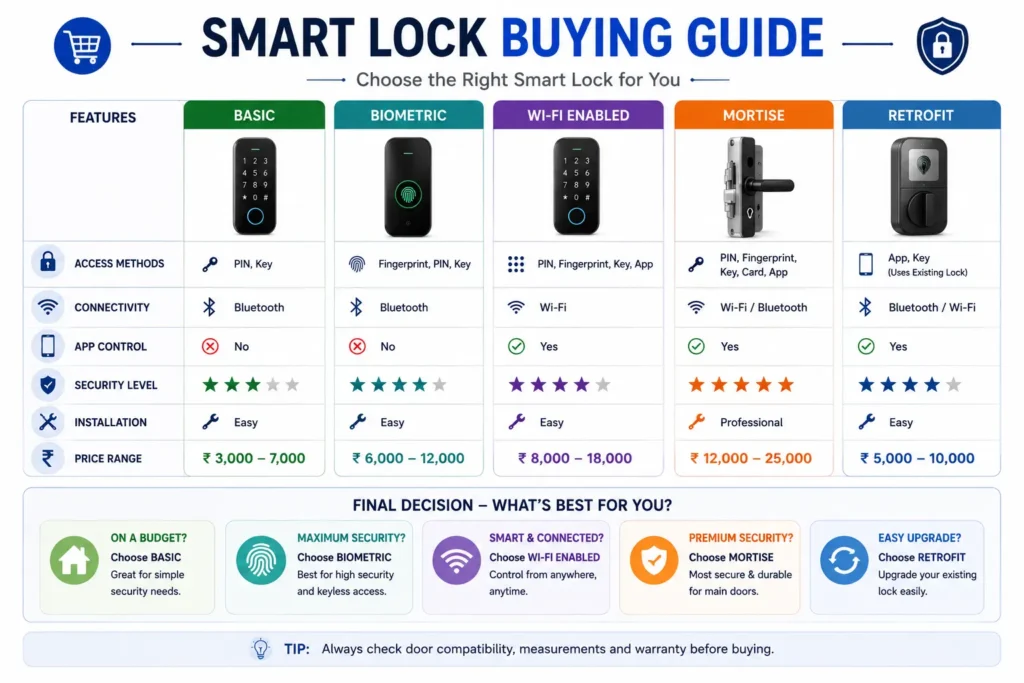
Smart Lock Troubleshooting: Common Problems and Solutions
Smart locks can occasionally experience problems involving batteries, authentication, connectivity, software, motor operation, or the physical alignment of the door. Many issues can be identified by checking the simplest possible causes before resetting the lock or contacting technical support.
Troubleshooting should begin with the manufacturer’s instructions for the specific model because the available controls, indicators, reset procedures, and emergency-access methods vary between smart locks.
Key Takeaway: Start troubleshooting with battery status, door alignment, authentication method, connectivity, and the manufacturer’s documented procedure before performing a factory reset.
Smart Lock Is Not Responding
If the smart lock does not respond to a PIN, fingerprint, smartphone command, or other normal input, first determine whether the lock has power.
- Check the battery or charge status.
- Look for low-battery indicators or warning sounds.
- Check whether the lock’s display, indicator, keypad, or other electronic component responds.
- Try another authorized access method if one is available.
- Use the manufacturer’s documented emergency-access procedure if normal electronic access is unavailable.
If the lock has power but remains completely unresponsive, avoid repeatedly forcing the door or locking mechanism. Refer to the manufacturer’s troubleshooting procedure or contact authorized support.
Fingerprint Is Not Recognized
Fingerprint recognition can fail because of sensor contamination, changes in finger condition, poor enrollment, positioning, or limitations of the particular sensor and implementation.
If the fingerprint does not work, try the manufacturer’s recommended finger-placement technique and make sure the sensor is clean. If the problem continues, use another authorized method such as a PIN, RFID/NFC credential, smartphone, or mechanical backup where available.
If repeated recognition failures occur, consider deleting and re-enrolling the fingerprint according to the manufacturer’s instructions rather than repeatedly attempting unsuccessful authentication.
PIN Code Is Not Working
If a programmed PIN is not accepted, first confirm that the correct code is being entered and that the keypad is responding normally.
- Check whether the keypad is active.
- Confirm that the correct user PIN is being entered.
- Check whether the PIN has expired or been revoked.
- Check whether the lock has temporarily restricted authentication after repeated failed attempts.
- Try another authorized access method if available.
Do not repeatedly enter incorrect credentials if the manufacturer specifies a lockout or failed-attempt protection mechanism.
Motor Runs but the Bolt Does Not Move Properly
A motorized smart lock depends on the door and locking mechanism being correctly aligned. If the motor operates but the bolt moves slowly, stops, or makes unusual sounds, the problem may be mechanical rather than electronic.
Check whether the door closes correctly and whether the bolt can be operated smoothly using the normal manual mechanism. Door sagging, frame movement, excessive friction, or misalignment can increase the load on the motor.
Note: Do not repeatedly force a motorized lock that is struggling against the door or frame. Correct the underlying mechanical alignment problem according to the manufacturer’s instructions.
Smart Lock Battery Drains Too Quickly
Faster-than-expected battery consumption can have several causes. Frequent lock cycles, connectivity configuration, environmental conditions, battery quality, and mechanical resistance can all affect power consumption.
Check the battery type and condition first. Then examine whether the door or locking mechanism requires excessive force and whether connected features are operating as expected.
If the manufacturer provides battery diagnostics or usage information through the lock or application, review that information before replacing components or changing configuration settings.
Bluetooth Is Not Connecting
If a smartphone cannot communicate with the smart lock over Bluetooth, first confirm that Bluetooth is enabled and that the phone is within the supported operating range.
- Confirm Bluetooth is enabled on the smartphone.
- Move closer to the lock.
- Check whether the manufacturer’s application has the required permissions.
- Restart the application if necessary.
- Check the lock and smartphone battery status.
- Follow the manufacturer’s recommended pairing or connection procedure.
If Bluetooth access is unavailable, use another authorized access method where available rather than depending on repeated connection attempts.
Wi-Fi or Remote Access Is Not Working
If remote access or cloud-based features stop working, determine whether the problem affects only the internet connection or also affects local operation of the lock.
Check the home network, required hub or bridge, application status, and manufacturer service information where applicable. Also verify whether the lock itself remains available through local methods such as PIN, fingerprint, RFID/NFC, Bluetooth, or a mechanical backup.
Tip: A remote-access problem does not necessarily mean that the physical lock has failed. First determine whether local access is still working.
Smart Lock App Is Not Working
If the manufacturer’s application does not connect to the lock or account, check whether the problem is limited to the application or affects the lock itself.
Check for application updates, account status, smartphone connectivity, required permissions, and manufacturer service availability. Avoid deleting the lock from the application or performing a factory reset unless the manufacturer’s instructions specifically recommend it.
Auto-Lock Is Not Working
If the auto-lock feature does not activate as expected, check the configured timer, door position, lock status, and any conditions that the manufacturer specifies for automatic locking.
Some smart locks may require the door to be fully closed or may use sensors to determine whether the door is in the correct position. A door that does not close or align correctly can therefore affect automatic locking.
Smart Lock Notifications Are Not Arriving
Missing notifications do not necessarily indicate a lock failure. Notifications may depend on the smartphone application, account settings, internet connection, hub, or manufacturer-operated service.
Check the application’s notification settings, smartphone permissions, connectivity, and the lock’s supported notification features. Also verify whether the event you expect to receive is actually supported by the specific model.
When Should You Factory Reset a Smart Lock?
A factory reset should generally be treated as a later troubleshooting step rather than the first solution. Resetting a smart lock can remove user credentials, configuration settings, network information, or other stored data depending on the product.
Before performing a reset, confirm that you understand the manufacturer’s procedure and have a way to configure the lock again. Make sure an authorized backup access method is available if the reset process temporarily changes normal access.
Note: Do not perform a factory reset simply because an app or Bluetooth connection is temporarily unavailable. First follow the manufacturer’s less-disruptive troubleshooting steps.
When to Contact the Manufacturer or a Professional
Contact the manufacturer, authorized service provider, or a qualified professional when the problem cannot be resolved using the documented troubleshooting procedure or when continued operation could affect the security or safe use of the door.
Professional assistance may be appropriate when there is physical damage, repeated motor failure, persistent mechanical resistance, damaged wiring or components, installation problems, or an unresolved electronic fault.
Smart Lock Troubleshooting Quick Guide
| Problem | First Things to Check | Possible Next Step |
|---|---|---|
| Lock not responding | Battery, indicators and alternate access method | Follow manufacturer troubleshooting procedure |
| Fingerprint fails | Sensor, finger placement and enrollment | Use backup credential or re-enroll |
| PIN not working | Correct code, expiry and lockout status | Use another authorized method |
| Motor struggles | Door alignment and bolt resistance | Correct mechanical problem |
| Battery drains quickly | Battery condition, usage and mechanical resistance | Check manufacturer diagnostics |
| Bluetooth unavailable | Phone, range, permissions and pairing | Use another access method |
| Wi-Fi/remote access unavailable | Network, hub and online service | Use local access if available |
| App not connecting | App version, account and connectivity | Follow manufacturer procedure |
| Auto-lock not working | Timer, door position and configuration | Check installation and settings |
| Notifications missing | App permissions and notification settings | Check supported events and connectivity |
Key Takeaway: Troubleshoot a smart lock systematically: check power → check the physical mechanism → check authentication → check connectivity → check the app/settings → follow the manufacturer’s procedure. If the problem involves physical damage, persistent mechanical resistance, or an unresolved electronic fault, seek appropriate professional support.
Smart Lock Security Best Practices
Smart-lock security depends on more than the physical lock. Users should also protect the access credentials, smartphone, account, application, home network, firmware, and physical door and locking mechanism.
Good security practices can reduce avoidable access risks while helping the smart lock remain reliable over time. The goal is to protect both the digital access layer and the physical security layer.
For a deeper look at whether smart locks are genuinely safe, including hacking risks, privacy, authentication, physical security, and practical protection measures, see our Are Smart Locks Safe? Hacking, Privacy & Security Explained guide.
Key Takeaway: A secure smart-lock setup requires protection of both the digital access system and the physical door and locking mechanism.
Manage Access Credentials Carefully
Treat PINs, fingerprints, RFID/NFC credentials, smartphone access, and digital user accounts as access permissions rather than simple convenience features.
- Use separate credentials for different users where supported.
- Avoid easily guessable PINs.
- Use temporary or time-limited credentials for short-term users where available.
- Remove credentials when a person no longer requires access.
- Review authorized users periodically.
Protect the Smart Lock Account and Smartphone
If the lock is managed through an application or online account, protect the account with a strong, unique password and enable additional authentication controls when supported.
Protect the smartphone used to manage the lock with its available device-security features. Keep the operating system and official smart-lock application updated, and avoid installing untrusted software.
If the smartphone is lost or stolen, secure the device, review active sessions or connected devices, and revoke smart-lock access where the manufacturer provides that option.
Secure the Home Network
If your smart lock uses Wi-Fi or communicates through a smart-home hub, the security of the home network can become part of the overall access-control system.
Use the manufacturer’s recommended network configuration and keep the router, hub, and other connected components updated. Avoid exposing smart-home devices directly to the internet unless the manufacturer specifically requires and supports that configuration.
Keep Firmware and Apps Updated
Manufacturers may release firmware and application updates to fix problems, improve compatibility, or address security issues. Use only manufacturer-supported update procedures and official software sources.
Before performing an important firmware update, understand the manufacturer’s procedure and make sure you know how to use the available backup access method.
Review Access Activity
If the smart lock provides access logs or security notifications, review them periodically for unexpected activity. Remove outdated credentials and investigate unfamiliar events according to the manufacturer’s procedures.
Access logs can contain information about people’s movements and entry activity, so they should also be protected and managed appropriately.
Understand Cloud and Connectivity Dependence
Some connected smart locks depend on a manufacturer’s application, cloud service, internet connection, or hub for certain features. Users should understand which functions continue to work when the internet, Wi-Fi network, smartphone, or cloud service is unavailable.
Local access methods such as a PIN, fingerprint, RFID credential, Bluetooth, or mechanical key may continue to work independently on some products, but this varies by model.
Note: Do not assume that a smart lock will provide the same functionality when its internet connection or cloud service is unavailable. Check the manufacturer’s documented offline and emergency-access behavior.
Maintain a Reliable Emergency Access Method
Always understand what happens if the battery is depleted, the smartphone is unavailable, connectivity fails, or the electronic system malfunctions.
Depending on the model, emergency access may use a mechanical key, emergency power, backup credential, or another manufacturer-supported method.
Authorized users should know how the emergency procedure works before an actual failure occurs.
Maintain the Physical Lock and Door
Electronic security does not replace physical maintenance. Periodically check the door, frame, lock body, bolt, mounting hardware, and surrounding components.
Pay attention to unusual motor sounds, increased friction, loose hardware, door sagging, or changes in the way the bolt or latch operates. Correct mechanical problems before they place additional load on the motorized mechanism.
Remove Access Before Selling or Transferring the Lock
Before selling, transferring, or permanently giving away a smart lock, remove previous users and digital credentials and follow the manufacturer’s recommended reset procedure.
If the lock is connected to an online account or smart-home platform, also remove the device from the associated account and connected services where required.
Smart Lock Security Routine
| Security Practice | Recommended Action |
|---|---|
| Credentials | Use appropriate PINs and remove unnecessary access. |
| Guest access | Use temporary or time-limited credentials where supported. |
| Account | Use a strong unique password and supported security controls. |
| Smartphone | Protect the device and keep its software updated. |
| Home network | Keep the router and connected smart-home components updated. |
| Firmware | Install manufacturer-supported updates. |
| Access logs | Review activity and remove outdated credentials. |
| Cloud connectivity | Understand which features work without internet or cloud access. |
| Emergency access | Know and periodically verify the backup procedure. |
| Physical condition | Check the door, frame, lock and mounting hardware. |
Key Takeaway: Long-term smart-lock security requires good digital-security practices, controlled access, reliable emergency procedures, and proper maintenance of the physical door and locking mechanism.
Frequently Asked Questions About Smart Locks
Here are answers to some of the most common questions about smart-lock types, security, compatibility, connectivity, batteries, installation, and buying considerations.
What is a smart lock?
A smart lock is an electronic locking system that can provide access through methods such as PIN codes, fingerprints, RFID/NFC credentials, smartphones, or other supported technologies. Depending on the model, it may also provide features such as remote access, access logs, notifications, and smart-home integration.
Are smart locks safe?
Smart locks can provide secure access control, but being “smart” does not automatically make a lock more secure than a traditional lock. Security depends on the physical locking mechanism, door and frame, installation, authentication, software, connectivity, and how the system is maintained and used.
Do smart locks need Wi-Fi?
Not necessarily. Some smart locks can provide local access using PIN, fingerprint, RFID/NFC, Bluetooth, or a mechanical key without requiring Wi-Fi. Wi-Fi may be required for features such as remote access, cloud services, notifications, or certain smart-home integrations.
Can a smart lock work without the internet?
Many smart locks can continue to provide supported local access when the internet is unavailable. However, remote unlocking, cloud-based management, notifications, and some connected features may stop working. Always check which functions operate locally on the specific model.
What happens when a smart lock battery dies?
The result depends on the lock design. Some models provide an external emergency power connection, mechanical key override, backup credential, or another manufacturer-supported access method. Before buying, identify the exact emergency procedure for the model you are considering.
How long do smart lock batteries last?
Battery life varies by model and usage. Factors such as the number of lock cycles, battery type, connectivity, temperature, door alignment, motor resistance, and additional electronic features can affect runtime. Manufacturer battery-life figures should therefore be treated as product-specific estimates.
Can smart locks be hacked?
Connected smart locks can have cybersecurity risks because they may involve applications, accounts, wireless communication, firmware, and cloud services. Risk depends on the product’s implementation and security practices. Use a strong unique account password, keep software updated, manage credentials carefully, and choose products with appropriate documented security support.
How do I know if a smart lock will fit my door?
Check the door material, thickness, existing lock mechanism, backset, lock dimensions, door handing, frame alignment, and available installation space. Compare these measurements with the manufacturer’s official compatibility requirements before purchasing.
What is the difference between a mortise and a retrofit smart lock?
A mortise smart lock uses a lock body installed within a pocket cut into the door, while a retrofit smart lock is designed to add smart functionality to compatible existing locking hardware. Retrofit installation may require fewer physical changes, but compatibility with the existing lock remains essential.
Do smart locks have a mechanical key?
Some smart locks have a mechanical key override, while others use different emergency-access methods such as external power or backup credentials. A physical key should never be assumed to be available. Check the manufacturer’s documentation for the exact model before purchase.
Are smart locks better than traditional locks?
Neither is universally better. Smart locks can provide keyless access, multiple users, temporary credentials, access logs, and connected features, while traditional locks generally offer simpler operation with less dependence on batteries, software, and connectivity. The better choice depends on the door and your actual requirements.
Are smart locks suitable for main doors?
A suitable smart lock can be used on a main entrance, provided it is compatible with the door and appropriate for the intended environment. Pay particular attention to physical security, door and frame condition, weather exposure, battery management, emergency access, and installation quality.
Are smart locks suitable for Indian doors?
Smart locks can be suitable for Indian doors, but compatibility varies between doors and lock mechanisms. Check the existing hardware, dimensions, door thickness, installation requirements, environmental conditions, and availability of local installation and after-sales support before purchasing.
What should I check before buying a smart lock?
First verify door compatibility and lock mechanism. Then evaluate authentication methods, connectivity, mechanical and electronic security, emergency access, battery requirements, privacy, software support, warranty, installation, and after-sales service. Verified specifications are more important than the number of advertised features.
Can a smart lock still work if Bluetooth or Wi-Fi stops working?
It depends on the product. A lock may continue to support local methods such as a PIN, fingerprint, RFID/NFC credential, or mechanical key even when Bluetooth or Wi-Fi is unavailable. Check the manufacturer’s documentation to determine which functions work independently of each connection.
Conclusion: Choosing the Right Smart Lock
A smart lock can make door access more convenient by providing features such as PIN codes, fingerprint authentication, RFID/NFC, smartphone access, temporary credentials, access logs, and smart-home connectivity. However, the best smart lock is not necessarily the one with the largest number of features.
The first priority should always be door and lock compatibility. After that, evaluate the physical locking mechanism, authentication methods, connectivity, mechanical and electronic security, battery life, emergency access, privacy, software support, installation, and after-sales service.
It is also important to understand what happens when something goes wrong. A reliable smart lock should have a clearly understood way for an authorized user to regain access if the battery, smartphone, internet connection, authentication method, or electronic system becomes unavailable.
For buyers in India, the UK, the US, or other markets, applicable standards and certification claims should be verified for the specific product and intended application. Marketing terms such as “high security,” “smart,” or “certified” should not replace checking documented specifications and test or certification information.
Final Takeaway: Choose a smart lock based on compatibility first, security second, and features third. A well-matched, properly installed lock with reliable emergency access and long-term manufacturer support is generally a better choice than a feature-rich model that does not suit your door or actual needs.