
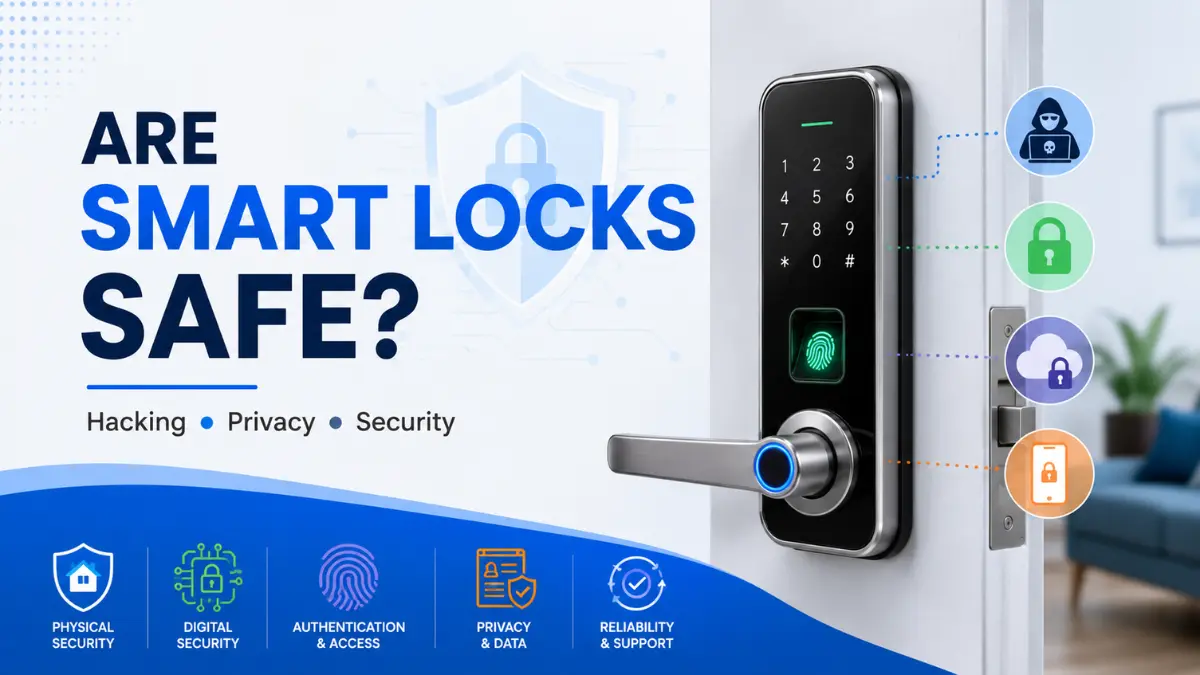
Are smart locks safe? It is a reasonable question when a device that controls your door also connects to a smartphone, wireless network, app or cloud service. Smart locks can make everyday access more convenient, but convenience does not automatically mean better or worse security.
The real answer depends on more than whether a smart lock can be hacked. Its overall security also depends on the physical lock and door, digital security, authentication methods, privacy practices and reliability of the complete system.
In this guide, we take a balanced look at smart lock security, including real-world hacking research, privacy and account risks, physical forced-entry concerns, authentication, manufacturer security practices and practical steps you can take to make a smart lock safer.
If you are new to smart locks and want to understand the broader features, types and buying considerations first, see our complete smart lock guide.
Quick Answer: Smart locks can be a secure choice when they use reputable hardware, receive security updates, are properly installed and use strong authentication and account protection. However, no smart lock is completely hack-proof or pick-proof. Overall security depends on the physical lock and door, digital security, authentication, privacy practices and reliability—not on connectivity alone.
What Does “Safe” Actually Mean for a Smart Lock?
When people ask whether smart locks are safe, they are often thinking only about hacking. In reality, smart-lock security is broader than the question of whether someone can compromise its wireless connection or mobile app.
A smart lock should be evaluated as a complete security system. Its overall safety depends on the strength of the physical lock and door, the security of its digital components, the way users are authenticated, how personal data is handled, and how the lock behaves when power, internet connectivity or online services are unavailable.
Physical Security
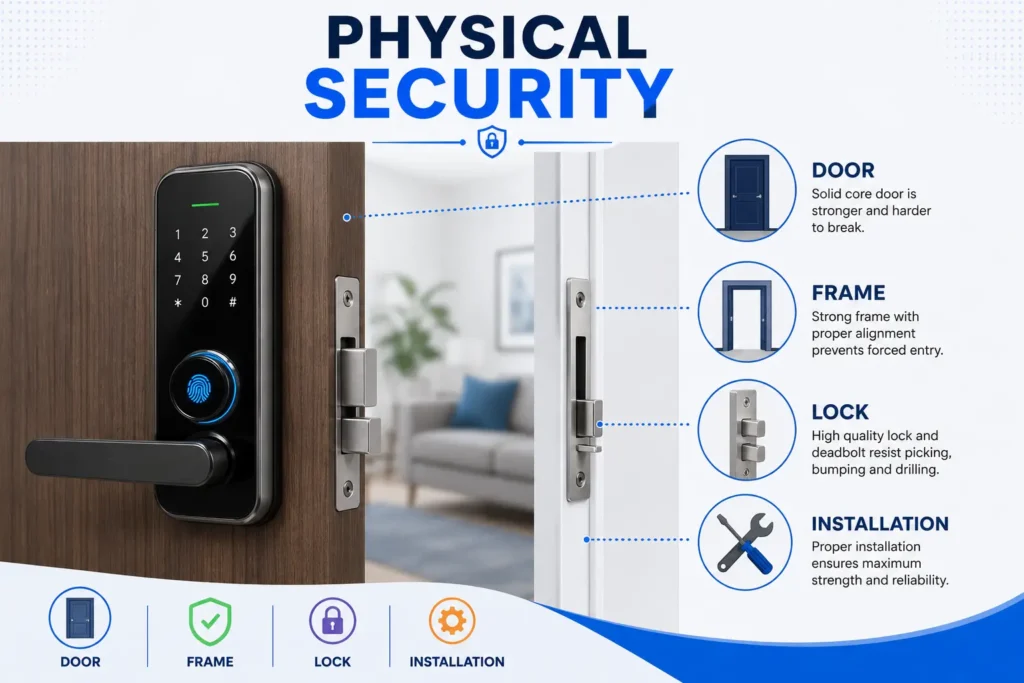
Physical security covers the lock hardware, door, frame and installation. A smart lock with strong digital security cannot compensate for a weak door, poorly secured hardware or an installation that allows the locking mechanism to be defeated through physical force.
Digital Security
Digital security covers the technologies and services used to operate the lock, including Bluetooth, Wi-Fi, mobile applications, cloud services, APIs and firmware. Weaknesses in any of these components can potentially affect the security of connected functions.
Authentication Security
Authentication determines how the lock verifies that someone is authorized to enter. Depending on the model, this may involve a PIN, fingerprint, smartphone, RFID/NFC credential or another supported method. The security of these methods depends on how they are implemented and managed.
Data Privacy
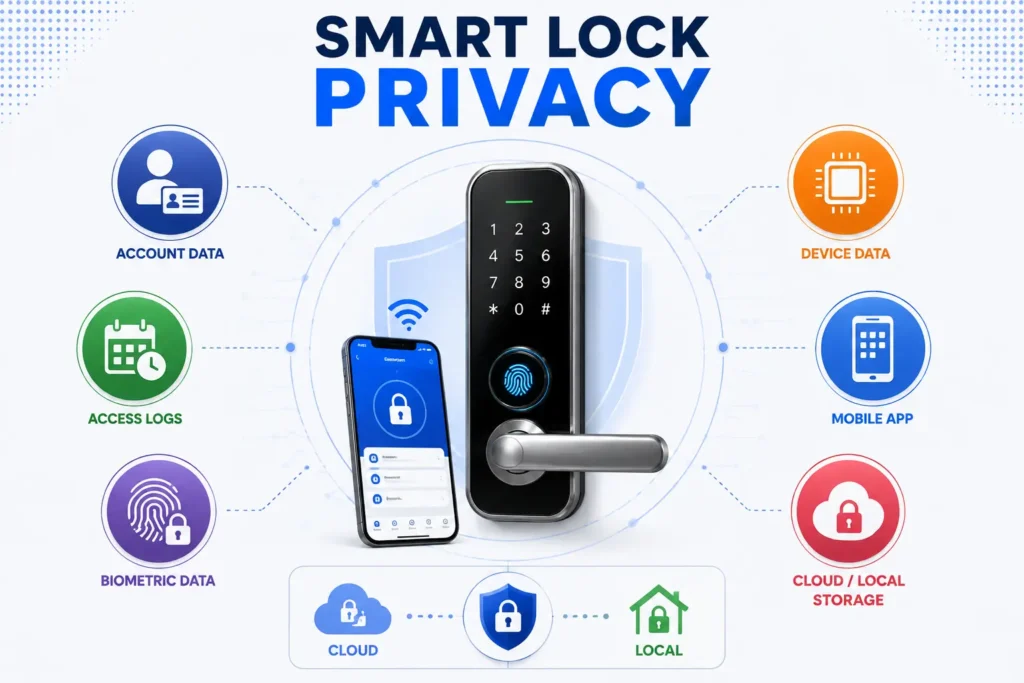
A connected lock can also generate or process information about users and access events. Depending on the product, this may include account details, access logs, device information, location-related data or biometric information. Privacy therefore needs to be considered separately from whether the door itself can be unlocked without authorization.
Reliability and Safe Operation
Security also includes what happens when something goes wrong. Battery depletion, an internet outage, a cloud-service interruption or a problem with the mobile application should not automatically leave users without a practical way to access the property. For a detailed explanation of smart lock battery life, including low-battery warnings, battery drain and emergency access, see our dedicated guide.
Key Point: A smart lock’s security is not determined by one feature such as Bluetooth, Wi-Fi, fingerprint authentication or encryption. The security outcome depends on how the complete system works together.
Physical Security: The Risk People Often Overlook
When people think about smart-lock security, the first concern is often whether someone could hack the lock. Digital attacks are important, but they are only one part of the overall threat. A smart lock still protects a physical door, so the lock hardware, door, frame and installation remain fundamental to security.
App security, encryption and strong authentication can protect the digital side of a smart lock, but they do not change the physical characteristics of the door and locking hardware. A weak strike area, poorly secured hardware or a vulnerable door assembly can still affect the practical security of the entrance.
The type of lock, cylinder or locking mechanism, the way it is mounted, the condition of the door and frame, and the quality of the installation can all influence the practical security of the entrance. These factors are not automatically improved simply because a traditional lock has been replaced with a smart one.
Smart Lock Security Is More Than Digital Protection
Digital security protects the electronic and connected parts of a smart lock, while physical security protects the actual entry point. Both need to work together. A vulnerability in an app or wireless connection may create one type of risk, while a weakness in the door or locking hardware may create a completely different one.
This is also why comparing a smart lock with a traditional lock requires more than comparing their unlocking methods. The physical construction, access methods, convenience and potential attack surfaces should all be considered together. For a broader comparison, see our Smart Lock vs Traditional Lock guide.
Installation Matters
A correctly installed smart lock should operate smoothly without unnecessary resistance or mechanical strain. Door alignment, latch or bolt movement, mounting and the condition of the existing hardware can affect both reliability and everyday operation.
If the physical installation is poor, adding stronger digital authentication or connectivity features does not solve the underlying mechanical problem. The electronic security of a smart lock should therefore be considered alongside the physical condition of the door and locking system.
Tip: When evaluating a smart lock, do not look only at its app, connectivity or authentication features. Check the complete door-and-lock assembly and make sure the installation is mechanically sound.
Can Smart Locks Actually Be Hacked?
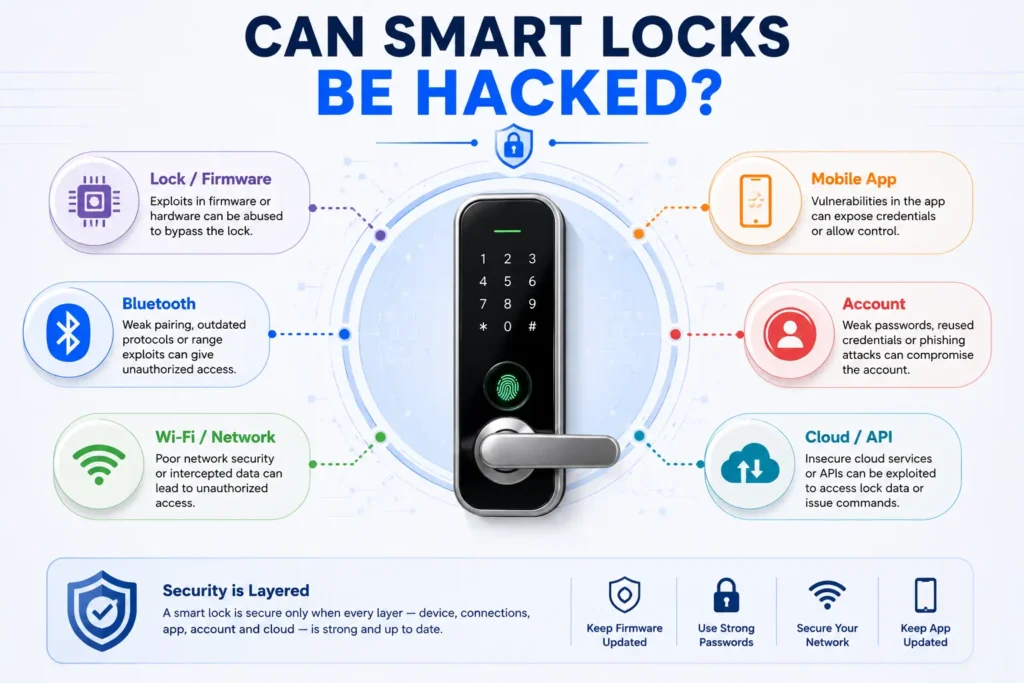
Yes. Like other connected devices, smart locks can have security vulnerabilities. However, saying that a smart lock can be hacked does not mean that every smart lock is easy to compromise or that connected locks are inherently unsafe.
The more useful question is where a vulnerability exists, how difficult it is to exploit, what access an attacker would need, and whether the manufacturer has addressed the issue. Security can depend on the lock’s hardware, wireless communication, firmware, mobile application, account system and cloud services.
What Older Research Found
Earlier research into Bluetooth-enabled smart locks demonstrated that some products could contain serious security weaknesses. These findings are important because they showed that wireless locks could have vulnerabilities beyond the physical locking mechanism.
However, older research should be interpreted in its original context. Smart-lock technology, software, wireless protocols and manufacturer security practices have changed over time. Findings from products tested years ago should therefore not be treated as a current vulnerability rate for the entire smart-lock market.
What More Recent Research Shows
More recent security research shows that vulnerabilities can involve more than the basic wireless connection. Researchers have examined issues involving replay attacks, access control, temporary permissions, device state, audit information and wireless communication.
For example, research presented at USENIX WOOT 2025 examined the Master Lock D1000 smart deadbolt and reported multiple security issues, including replay attacks, problems involving access revocation, clock manipulation, audit-log manipulation and Bluetooth Low Energy denial-of-service conditions.
This does not mean that every smart lock has these vulnerabilities. The broader lesson is that smart-lock security depends on the quality of the complete implementation, including how authentication, access permissions, wireless communication and device state are designed and protected.
You can read the full technical findings in the 2025 USENIX research on Master Lock smart-lock vulnerabilities.
Where Smart-Lock Attacks Can Happen
A connected smart lock can have several potential security surfaces. An attacker does not necessarily need to attack the lock’s physical mechanism directly; depending on the product, weaknesses could exist in another component of the system.
| Attack Surface | Example |
|---|---|
| Physical | Forced entry or weaknesses in the door and locking hardware |
| Local wireless | Bluetooth or other short-range communication attacks |
| Network | Weaknesses involving network-connected functions |
| App or account | Compromised credentials or unauthorized account access |
| Cloud or API | Authorization or access-control weaknesses |
| Firmware | Software vulnerabilities in the lock or connected components |
| Authentication | Weaknesses involving PINs, biometrics or other credentials |
| Privacy | Unauthorized exposure of account or access-related data |
Connectivity technologies can introduce different requirements and risks. For a detailed comparison of Bluetooth, Wi-Fi and Matter, including how these technologies affect connectivity and security considerations, see our Wi-Fi vs Bluetooth vs Matter Smart Locks guide.
Important: A published vulnerability in one smart lock should not automatically be treated as evidence that every smart lock is vulnerable. Always consider the specific model, affected component, attack requirements, manufacturer response and available security updates.
How Manufacturers Reduce Smart-Lock Security Risks
Smart-lock security does not depend on a single feature. Manufacturers can reduce risk by protecting the device, its communications, software, user accounts and supporting services throughout the product’s security lifecycle.
This is important because a smart lock is part of a connected system. A strong lock mechanism can still be affected by weaknesses in software or account security, while good digital protection cannot replace sound physical hardware. The goal is to make the different parts of the system work together securely.
Encryption and Secure Communication
Smart locks may exchange information with smartphones, hubs, home networks or online services. Appropriate encryption and secure communication mechanisms can help protect information while it is being transmitted and reduce the risk of unauthorized interception or manipulation.
However, encryption is only one layer of protection. It does not by itself guarantee that the lock, application, account or cloud service is secure.
Strong Authentication and Account Protection
Connected smart locks should provide appropriate ways to authenticate authorized users and protect administrative functions. Depending on the product, this can include secure credentials, account protection and additional authentication controls.
Account security becomes particularly important when a lock supports remote management. If an attacker gains control of a user’s account, the risk may extend beyond the physical device to connected access-management functions.
Secure Software and Firmware Updates
Security vulnerabilities can be discovered after a smart lock has already reached customers. A manufacturer therefore needs a practical way to identify security issues and deliver appropriate software or firmware updates when required.
Before buying a smart lock, it is worth checking whether the manufacturer clearly explains how security updates are delivered and whether information about the product’s security support is available.
Access Revocation
A secure access-control system should also handle changes in authorization correctly. When a guest, employee, service provider or former household member no longer needs access, their credential should be removable or revocable according to the capabilities of the specific product.
This is especially important for locks that support temporary or shared credentials. Creating access is only one part of access management; removing it reliably is equally important.
Vulnerability Disclosure and Security Support
Security depends not only on the device itself but also on how the manufacturer responds when problems are discovered. A clear vulnerability-reporting process, security documentation and ongoing support can help manufacturers identify and address issues during the product lifecycle.
NIST’s IoT cybersecurity guidance provides a useful framework for thinking about the capabilities that can help make connected devices more securable. It is guidance for IoT cybersecurity and should not be treated as a certification that a particular smart lock is secure.
For more detail, see the NIST IoT cybersecurity guidance.
Secure Device Configuration
Security also depends on how the device is configured. Manufacturers can reduce risk by providing secure default settings, appropriate access controls and clear instructions that help users configure the lock correctly.
Key Point: Security features such as encryption, authentication and software updates can reduce specific risks, but no individual feature makes a smart lock completely secure. The overall security depends on how the device, software, accounts and supporting services are designed and maintained together.
Biometric and PIN Security: What You Should Know
Authentication is another important part of smart-lock security because it determines how the lock decides whether someone is authorized to enter. Depending on the model, a smart lock may support fingerprints, PIN codes, smartphones, RFID/NFC credentials or a combination of these methods.
Fingerprint authentication can provide convenient access without requiring users to remember a code or carry a key. However, recognition performance and security depend on the sensor, implementation, enrollment process and how the manufacturer protects biometric data.
PIN-based access has a different risk profile. Predictable codes, unnecessary sharing or someone observing a PIN can weaken access control. Features such as individual user codes, temporary credentials, expiry controls and failed-attempt protection can help when supported by the specific lock.
It is also important to distinguish authentication from connectivity. A lock may use a fingerprint or PIN for local authentication while using Bluetooth, Wi-Fi or another technology for connected features. Choosing one authentication method therefore does not automatically determine the security of the entire smart-lock system.
For a detailed comparison of the strengths, limitations and practical considerations of these two common authentication methods, see our Fingerprint vs PIN Code Smart Lock guide.
Key Point: A fingerprint or PIN can be an important part of access security, but authentication is only one layer. The security of the complete smart lock also depends on its hardware, software, connectivity, account protection and privacy practices.
Smart Lock Privacy: What Data Can Be Collected?
Smart-lock security is not only about preventing unauthorized unlocking. Privacy is a separate consideration because a connected lock may collect, process or store information about the people who use it and the way the device is operated.
The exact information depends on the manufacturer, product, mobile application and connected services. Before buying a smart lock, check its privacy policy, data practices, account requirements and storage model rather than assuming that every smart lock handles information in the same way.
Account and Profile Data
A smart-lock application may require an account to manage the device. Depending on the service, this can involve information such as a name, email address, account identifier, device details or other information needed to operate the connected features.
The amount of information collected can vary considerably between products. A lock that operates primarily through local controls may have different data requirements from one that relies heavily on a cloud-connected account.
Access Logs and Activity Data
Some smart locks can record events such as locking, unlocking or changes to user credentials. Depending on the product, these records may include timestamps, user identifiers, device information or other details associated with an access event.
Access history can be useful for legitimate security and management purposes, but it can also reveal information about how a property is being used. Users should therefore understand what activity data is collected, where it is stored and how long it is retained.
Location and Device Information
Connected applications and services may process device or network information as part of normal operation. Depending on the product and its permissions, location-related information may also be involved.
This does not mean that every smart lock collects precise location information. The relevant question is what the specific application and service actually collect and why that information is required.
Biometric Data
A fingerprint-enabled smart lock introduces another privacy consideration: how biometric information is handled. Fingerprint authentication does not automatically mean that a manufacturer stores a complete image of your fingerprint in the cloud.
Some systems may process biometric information locally on the device, while other implementations may use different storage or processing methods. The only reliable way to determine how a particular lock handles biometric information is to review the manufacturer’s technical documentation and privacy policy.
Cloud vs Local Processing
The location where data is processed or stored can affect the privacy and dependency profile of a smart lock. Local processing can reduce some forms of cloud dependency, while cloud-connected systems may provide additional features such as remote management, synchronization or activity history.
Neither approach should automatically be considered completely private or completely secure. What matters is what information is processed, how it is protected, who can access it, how long it is retained and which functions depend on an online service.
Privacy Check: Before buying a connected smart lock, review the manufacturer’s privacy policy and data practices to understand what information is collected, where it is processed or stored, how long it is retained and which connected features require an account or cloud service.
What Happens If the Manufacturer’s System Is Compromised?
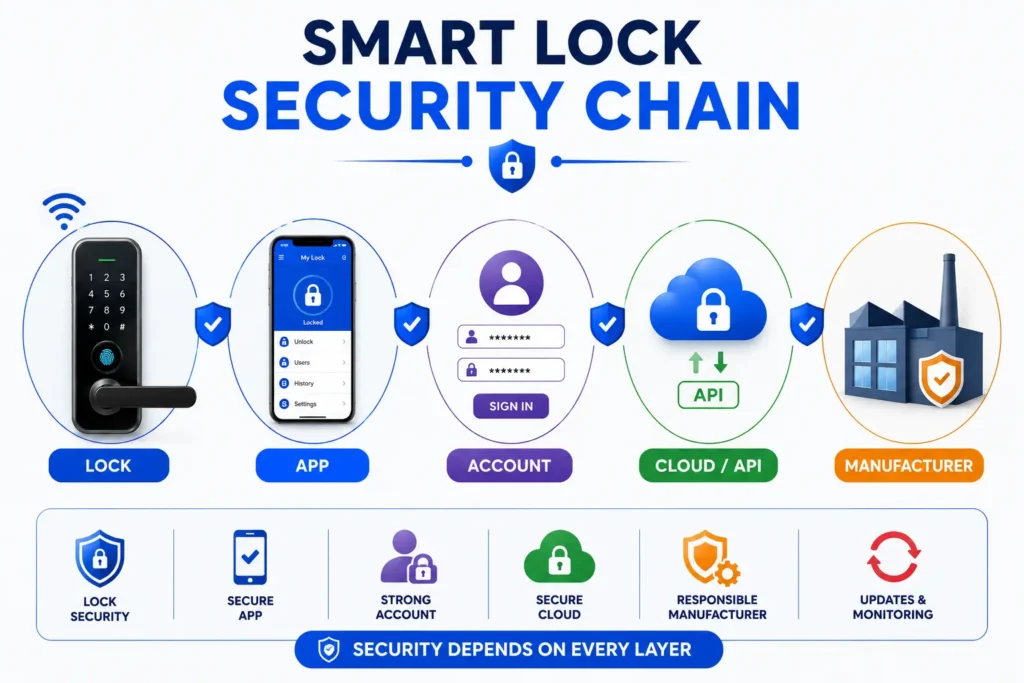
A connected smart lock may depend on more than the physical device at your door. Depending on the product, the system can involve the smart lock, mobile application, user account, cloud services and APIs. A weakness in one part of this chain can potentially affect connected functions even when the physical lock itself has not been physically attacked.
This is why smart-lock security should be evaluated as an entire system rather than focusing only on the lock’s hardware or wireless connection.
The Smart-Lock Security Chain
A typical connected setup can be viewed as:
| Component | Potential Security Concern |
|---|---|
| Smart Lock | Firmware or device-level vulnerabilities |
| Mobile App | Application vulnerabilities or insecure handling of credentials |
| User Account | Credential theft or unauthorized account access |
| Cloud/API | Authorization, authentication or data-security weaknesses |
| Manufacturer | Security practices, vulnerability response and data handling |
What Could Be Affected?
The consequences depend on the specific vulnerability and the functions exposed by the affected system. A compromise could potentially involve account information, access credentials, activity records or connected management functions.
This does not mean that a breach of a manufacturer’s system automatically gives an attacker direct control of every lock. Security impact depends on the architecture of the product, the affected component, the permissions available to an attacker and the protections implemented by the manufacturer.
The Tapplock Case: Why Security Claims Matter
The history of connected locks also shows why manufacturers should avoid making absolute security claims. In 2020, the U.S. Federal Trade Commission took action involving Tapplock and alleged that the company had made deceptive security claims while failing to implement reasonable security measures.
The case is useful as a real-world example because it demonstrates that smart-lock security is not simply about whether a product has encryption or a particular authentication feature. Security claims, implementation, data protection and the manufacturer’s overall security practices all matter.
You can review the official details in the FTC’s Tapplock smart-lock case.
Key Point: A smart lock can have strong hardware and still be affected by weaknesses elsewhere in its connected ecosystem. When evaluating security, consider the entire chain from the lock and app to the account, cloud services and manufacturer’s security practices.
Common Smart Lock Security Myths
Smart-lock security is often discussed in extremes. Some claims make connected locks sound completely unbreakable, while others suggest that any smart lock is inherently unsafe. Neither view gives buyers a useful way to evaluate the actual security of a product.
“Smart Locks Cannot Be Hacked”
No connected device should be described as completely immune to hacking. Security vulnerabilities can exist in hardware, firmware, wireless communication, applications, accounts or cloud services. The more useful question is how difficult a vulnerability is to exploit, what access an attacker needs and how quickly the manufacturer responds when a problem is discovered.
“Smart Locks Are Automatically Less Secure Than Traditional Locks”
A smart lock and a traditional lock have different security characteristics and different potential failure or attack surfaces. A smart lock introduces electronic and connected components, but it can also provide features such as individual credentials, access management and activity records that are not normally available with a conventional key-only lock.
The practical security of either type depends on the specific hardware, installation, access method and way the system is used. The presence of electronics alone does not determine the final security outcome.
“Encryption Makes a Smart Lock Completely Secure”
Encryption can protect data and communications against certain types of interception, but it is only one security layer. A vulnerability in authentication, account management, firmware, application logic or physical hardware can create a different type of risk that encryption alone does not solve.
This is why a smart lock should be evaluated as a complete system rather than judged by a single security specification.
“Matter Means the Lock Is Completely Secure”
Matter is designed to improve interoperability between compatible smart-home devices and provides security mechanisms within the standard. However, Matter compatibility does not guarantee that every part of a smart lock’s implementation, application, account, cloud service or physical hardware is secure.
If you want to understand how Bluetooth, Wi-Fi and Matter differ and what each connectivity approach means for a smart lock, see our Wi-Fi vs Bluetooth vs Matter Smart Locks guide.
“Fingerprint Is Always Safer Than PIN”
Fingerprint and PIN authentication have different strengths and limitations. Fingerprint recognition can provide convenient access without requiring users to remember a code, while PINs can be easier to replace or revoke when access needs to be shared.
The security of either method depends on the specific implementation, user behavior and available protection against unauthorized attempts. There is therefore no universal rule that one method is always safer in every situation.
For a more detailed comparison of these authentication methods, see our Fingerprint vs PIN Code Smart Lock guide.
Key Point: Avoid both extremes: a smart lock is neither automatically hack-proof nor automatically unsafe. The right approach is to evaluate its physical hardware, digital security, authentication, privacy and reliability as a complete system.
How to Make Your Smart Lock Safer
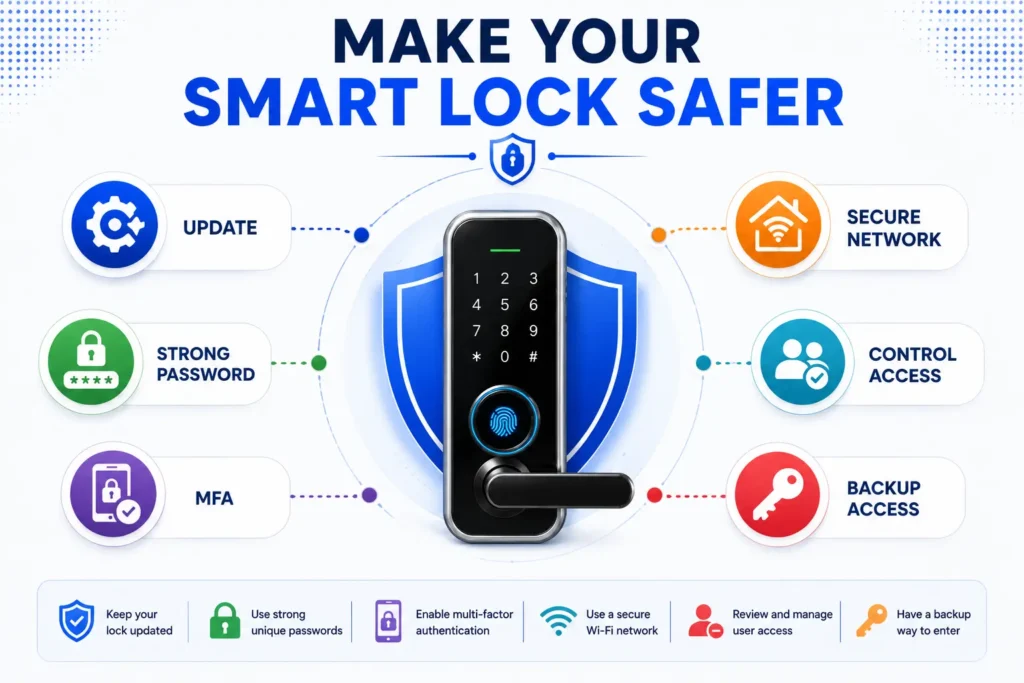
Choosing a reputable smart lock is only the first step. The way the lock is installed, configured, updated and used can also affect its practical security. A few basic measures can reduce avoidable risks without making everyday access unnecessarily complicated.
Focus on the Most Important Security Controls
Start with the manufacturer’s security track record and the product’s long-term support. A smart lock that receives security updates and has clear information about account protection is generally easier to maintain securely over time.
For connected models, protect the account used to manage the lock with a strong, unique password and enable multi-factor authentication when the manufacturer supports it. Account protection becomes especially important when remote management is available.
Firmware and application updates should also be installed when appropriate. Security updates can address vulnerabilities discovered after a product has already been sold, so ignoring available updates can leave known weaknesses unresolved.
Smart Lock Security Checklist
| क्या करें | क्यों ज़रूरी है |
|---|---|
| Reputable manufacturer चुनें | Security support, product quality और vulnerability response को बेहतर तरीके से evaluate किया जा सकता है। |
| Security-update support देखें | Future vulnerabilities के लिए firmware और software updates महत्वपूर्ण हो सकते हैं। |
| Strong, unique account password इस्तेमाल करें | Compromised या reused passwords से account-level risk कम करने में मदद मिलती है। |
| MFA/2FA उपलब्ध हो तो enable करें | Password compromise होने पर account protection की एक अतिरिक्त layer मिलती है। |
| Firmware और mobile app updated रखें | Available security fixes को लागू रखने में मदद मिलती है। |
| हर user के लिए अलग credential रखें | Access को individual users के अनुसार manage और revoke करना आसान होता है। |
| पुराने users और permissions हटाएँ | जिस व्यक्ति को अब access की आवश्यकता नहीं है, उसके credentials active नहीं रहने चाहिए। |
| Home network को सुरक्षित रखें | Connected smart-home devices के लिए मजबूत network security महत्वपूर्ण है। |
| Privacy policy और data practices पढ़ें | आप समझ सकते हैं कि कौन-सा data collect, process, store या share किया जा सकता है। |
| Backup access method test करें | Battery, app, network या service समस्या होने पर access बनाए रखने में मदद मिलती है। |
| Door और lock hardware की स्थिति जाँचें | Digital security के साथ physical security भी मजबूत रहनी चाहिए। |
Installation भी इस checklist का महत्वपूर्ण हिस्सा है। Door alignment, latch or bolt movement और mounting जैसी mechanical conditions को सही रखना smart lock की reliability और physical security दोनों के लिए महत्वपूर्ण है। हमारे Smart Lock Installation guide में installation और configuration के practical steps विस्तार से बताए गए हैं।
Tip: Security को complicated बनाने की जरूरत नहीं है। Strong account protection, current software, controlled user access and sound physical installation से शुरुआत करें और फिर अपने smart lock की specific features और risks के अनुसार settings configure करें।
Emergency Egress: A Quick Safety Reminder
Smart-lock security should also be considered alongside emergency egress. A lock that provides strong access control during normal use should still allow occupants to exit safely when an emergency requires them to leave the property.
The appropriate egress arrangement depends on the specific lock, door configuration, building type and applicable local requirements. Before installing a smart lock, verify how occupants can exit from the inside during a power failure or other emergency and make sure the required backup or mechanical operation remains practical.
Important: Do not treat emergency egress as just another smart-lock feature. The lock should be evaluated as part of the complete door, exit and building arrangement, with applicable local safety requirements considered before installation.
India, UK and US: What Should Buyers Know?
Smart-lock security and privacy considerations can vary by market because manufacturers may be subject to different product-security and data-protection requirements. These rules do not mean that every smart lock sold in a particular country has the same level of security, but they can provide useful context when evaluating a product.
India: Data Privacy and Smart Locks
In India, connected smart locks can involve the processing of personal information through mobile applications, user accounts and connected services. Depending on the product and its data practices, this may include information associated with users, devices or access activity.
India’s Digital Personal Data Protection framework provides a legal framework for the processing and protection of digital personal data. For smart-lock buyers, the practical takeaway is to understand what personal data a manufacturer or service provider collects, why it is processed, how it is protected and how the relevant privacy rights and obligations apply.
You can refer to the official text of the Digital Personal Data Protection framework on India Code for the applicable legal provisions.
UK: Product Security Requirements
The UK has introduced specific product-security requirements for consumer connectable products through the Product Security and Telecommunications Infrastructure (PSTI) regime. These requirements are relevant to covered internet- or network-connected consumer products and address areas such as security requirements, manufacturer responsibilities and information provided to consumers.
For smart-lock buyers, this means UK product-security requirements are an additional consideration when evaluating a connected device. However, compliance with a regulatory framework should not be interpreted as a guarantee that a particular smart lock is completely secure.
For the official UK guidance, see the UK consumer connectable-product security requirements.
US: IoT Security and Consumer Protection
In the United States, smart-lock security can involve both technical cybersecurity practices and consumer-protection considerations. Manufacturers and service providers may need to consider how they represent the security of their products and how personal information and connected services are protected.
The U.S. regulatory landscape is not a single smart-lock security standard that guarantees the security of every product. Buyers should therefore continue to evaluate the specific manufacturer’s security practices, update support, authentication controls, privacy policy and physical hardware.
How to Evaluate a Smart Lock Before Buying
A smart lock should not be evaluated by one specification such as fingerprint access, Wi-Fi connectivity or encryption. Before buying, look at the complete security and ownership picture and consider how the lock will work in your actual home or property.
| What to Check | Why It Matters |
|---|---|
| Authentication methods | Determines how authorized users can gain access and how credentials are managed. |
| Firmware and software updates | Regular security updates can help address vulnerabilities discovered after purchase. |
| Security support | Long-term support matters when vulnerabilities are discovered after the product is already in use. |
| Account protection | Strong credentials and available MFA can reduce the risk of unauthorized account access. |
| Access revocation | Old, temporary or unwanted credentials should be removable when access is no longer required. |
| Privacy policy | Helps you understand what personal, device and access-related information may be collected or processed. |
| Cloud dependency | Shows whether important connected functions depend on an online service or manufacturer platform. |
| Local operation | Helps determine what you can still do if the internet, app or cloud service becomes unavailable. |
| Physical hardware | The lock, door, frame and mounting arrangement remain fundamental to physical security. |
| Backup access | A practical backup method can help during battery, connectivity or electronic failures. |
| Manufacturer support | Support availability can affect troubleshooting, security updates and long-term product use. |
Look at the Complete Security Picture
The best choice is not necessarily the lock with the longest feature list. A model with fewer connected features may be more appropriate if you prefer local operation and lower dependence on online services, while a connected model may make sense if you need remote management and smart-home integration.
Before making a purchase, compare the manufacturer’s documented security practices, privacy terms, supported access methods, update policy and physical installation requirements. This helps you judge the actual product rather than assuming that a particular feature automatically makes one smart lock safer than another.
Buying Tip: Do not compare smart locks only by the number of features they offer. Prioritize the combination of physical security, security support, authentication, privacy, reliability and the features you actually need.
Frequently Asked Questions
Are smart locks safer than traditional locks?
Not automatically. Smart locks can provide additional access-control and management features, but they also introduce electronic and connected components. Overall security depends on the specific lock, physical installation, authentication, digital security, privacy practices and reliability.
Can a smart lock be hacked remotely?
A connected smart lock can potentially have vulnerabilities in its app, account, cloud service, API or other connected components. However, the existence of a potential attack does not mean every smart lock can be remotely compromised. The actual risk depends on the specific product and its security implementation.
Can someone hack a smart lock through Bluetooth?
Bluetooth can introduce its own security considerations, and vulnerabilities have been found in some implementations. However, Bluetooth itself does not automatically make a smart lock insecure. The security of the specific device, communication protocol, authentication and implementation all matter.
Are smart-lock fingerprints safe?
Fingerprint authentication can be a useful access method, but its security and privacy depend on the sensor, implementation, storage and processing method used by the specific lock. A fingerprint-enabled lock should therefore be evaluated based on its actual biometric and data-handling practices rather than the presence of a fingerprint sensor alone.
Do smart locks collect personal data?
Some smart locks and their connected applications may collect information such as account details, device information, access events or other data required for their services. The exact data collected varies by manufacturer and product, so reviewing the specific privacy policy is important before purchase.
What happens if a smart-lock company is hacked?
The impact depends on which part of the manufacturer’s system is compromised and what permissions or information are exposed. Possible consequences can include account or access-data exposure, service disruption or risks to connected management functions. A company-system breach does not automatically mean that every physical lock can be remotely opened.
Are smart locks safe without internet?
It depends on the model and the function being used. Many smart locks can provide some local access through methods such as a PIN, fingerprint, Bluetooth or mechanical key, while remote management and certain cloud-based features may require an internet connection. Always check the manufacturer’s specifications for the exact model.
What is the most important security feature to look for in a smart lock?
There is no single feature that guarantees security. Instead, look for a combination of strong physical hardware, reliable security updates, secure authentication, account protection, controlled user access, appropriate privacy practices and a practical backup-access method.
Quick Takeaway: The safest approach is not to ask whether smart locks are simply “safe” or “unsafe.” Evaluate the specific model and its complete security system before buying.
Final Takeaway
So, are smart locks safe? They can be, but their security should never be judged by a single feature such as fingerprint access, Wi-Fi connectivity, encryption or the ability to control the lock from a smartphone.
A better approach is to evaluate the complete system across five areas: physical security, digital security, authentication, privacy and reliability. A reputable manufacturer, appropriate security updates, strong account protection, controlled user access and sound physical installation can all contribute to a safer setup.
At the same time, no connected lock should be considered completely hack-proof or failure-proof. Real-world security depends on the specific product, how it is configured, how it is maintained and how its manufacturer responds when vulnerabilities are discovered.
If you are still comparing smart-lock types, features, connectivity options and buying considerations, see our complete smart lock guide for a broader overview.
Key Takeaway: The right question is not simply “Are smart locks safe?” Instead, ask whether the specific lock provides an appropriate balance of physical security, digital protection, authentication, privacy and reliable operation for the way you plan to use it.