
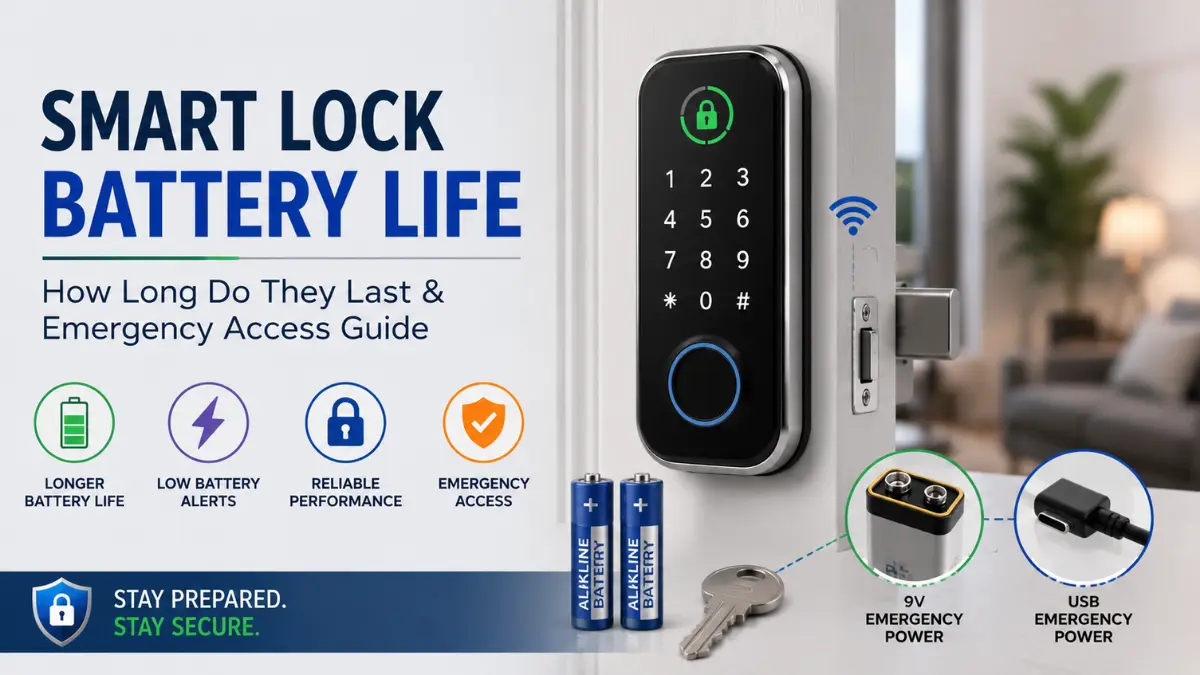
Smart lock battery life is an important part of owning a smart lock. Unlike a traditional lock, a smart lock depends on batteries to power its electronic and motorized functions, so battery performance can directly affect everyday access.
Most smart locks can operate for several months, but how long smart lock batteries last depends on factors such as usage, door alignment, motor strain, connectivity, battery type, and temperature.
In this guide, we’ll explain why smart lock batteries drain quickly, how to extend smart lock battery life, and what to do when a smart lock battery dies, including manufacturer-supported emergency access methods.
If you’re new to smart locks, start with our complete guide to smart locks to understand the different types, features and access methods.
Quick Answer: Smart lock battery life typically lasts for several months, with some models rated around 6–12 months or more depending on usage and configuration.
How long smart lock batteries last can vary with lock usage, door alignment, motor strain, connectivity, battery type, and temperature. If a smart lock battery dies completely, use the lock’s manufacturer-supported emergency access method, such as a mechanical key or external emergency power where provided.
How Long Do Smart Lock Batteries Usually Last?
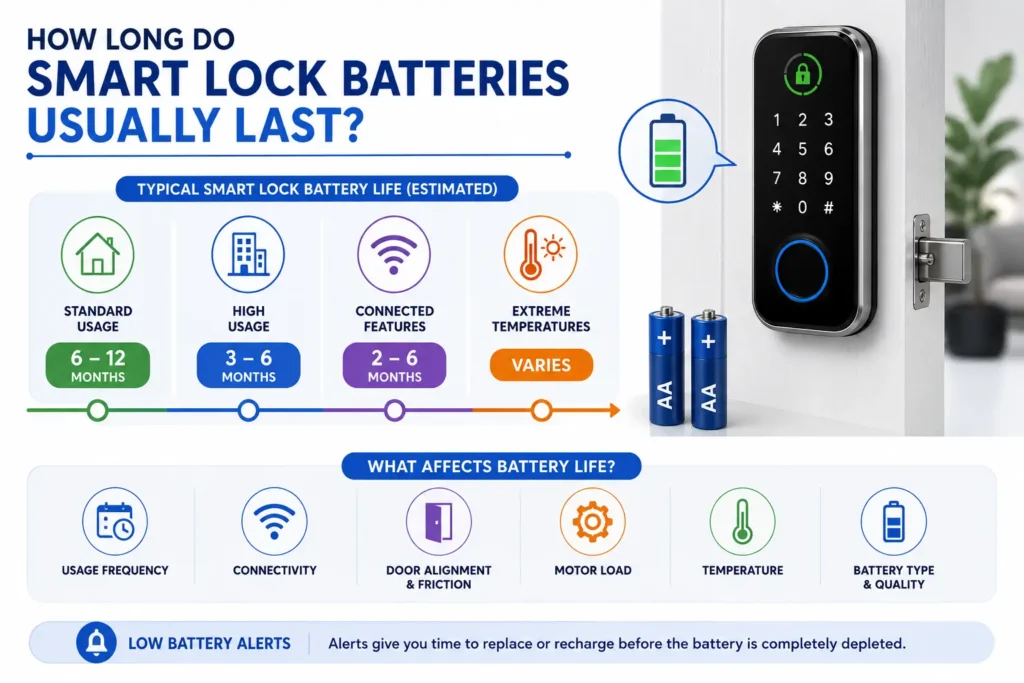
Most smart locks are designed to operate for several months before their batteries need to be replaced or recharged. Some models are rated for around 6–12 months or more, but actual smart lock battery life depends on the specific lock, battery system and how it is used.
Battery-life estimates are based on particular usage and operating conditions. Frequent locking and unlocking, wireless connectivity, door resistance, temperature and battery type can all affect how long smart lock batteries last in everyday use.
What Is a Typical Smart Lock Battery Life?
There is no single battery-life figure that applies to every smart lock. A low-use lock may operate for longer than a heavily used main entrance, while models with different connectivity options or rechargeable battery systems may have different power requirements.
For this reason, treat the manufacturer’s published battery-life estimate as a reference point rather than a guaranteed operating period. Always check the specifications for the exact smart-lock model you plan to use.
Why Battery Life Varies From Home to Home
Two identical smart locks can have different battery performance because their operating conditions are different. A busy household may generate many more lock cycles than a door that is opened only occasionally.
- Usage: More locking and unlocking cycles can increase battery consumption.
- Motor load: A stiff or poorly aligned deadbolt can require more effort from the motor.
- Connectivity: Wi-Fi and other wireless features can affect power consumption.
- Battery type: Different models require different battery chemistries or rechargeable systems.
- Temperature: Operating conditions can affect battery performance.
Why Battery-Life Estimates Are Not Always Comparable
Battery-life figures from different manufacturers should not be compared without looking at the conditions behind them. The number of daily lock cycles, connectivity settings, battery configuration and testing conditions can all influence the published estimate.
When comparing a smart lock battery, look beyond the headline battery-life number and check the manufacturer’s stated usage conditions and battery requirements.
Note: A smart lock advertised with a longer battery life is not necessarily more efficient in every home. Consider the usage conditions, battery type, connectivity, mechanical operation and emergency-access options before comparing models.
What Actually Drains a Smart Lock Battery?
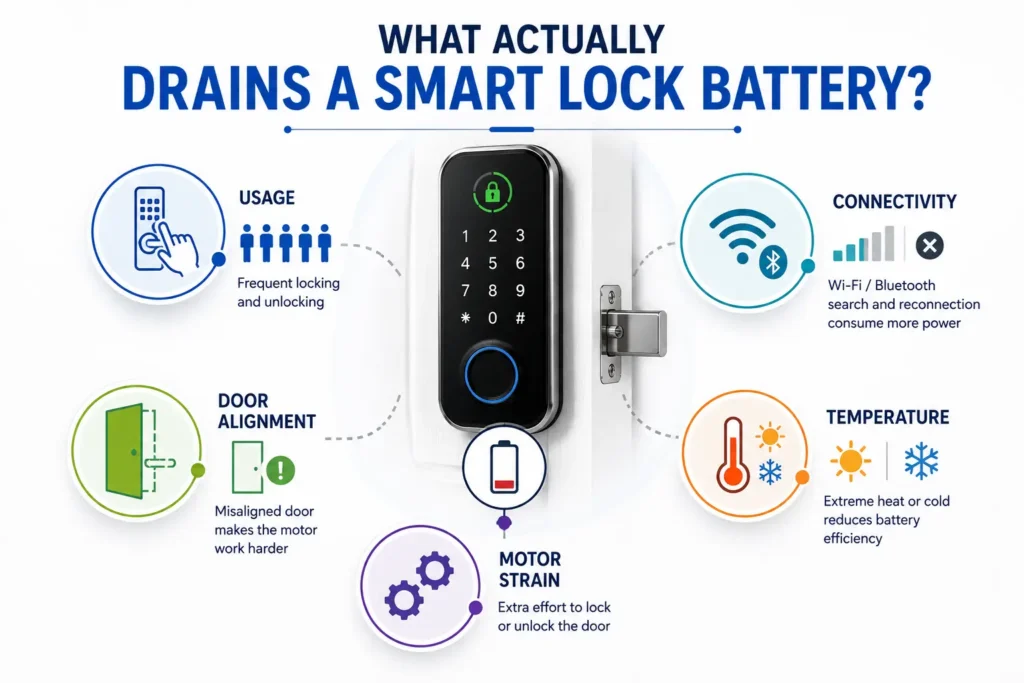
Smart lock battery drain is not caused by the battery alone. The way a smart lock is used, how much work its motor has to do, and how it communicates with other devices can all affect power consumption.
Frequent Locking and Unlocking
Every locking or unlocking cycle can require the motor and electronic components to operate. A smart lock installed on a frequently used main entrance may therefore consume more power than one installed on a door that is opened less often.
Features such as automatic locking can also increase the number of operating cycles. If your smart lock battery seems to drain faster than expected, consider how frequently the lock is actually being activated each day.
Door Alignment and Motor Strain
Mechanical resistance is one of the most overlooked causes of excessive battery drain. If the deadbolt rubs against the strike or the door puts pressure on the bolt, the motor may have to work harder to complete each locking or unlocking cycle.
A properly aligned door should allow the bolt to move smoothly without excessive force. If the lock operates easily with the door open but becomes noticeably harder to operate when the door is closed, the door, frame or strike alignment should be checked. For related fitting and adjustment guidance, see our smart lock installation guide. If you are still trying to identify the cause of unusual battery drain or lock behavior, use our smart lock troubleshooting guide for a systematic diagnostic approach.
Pro Tip: Before replacing batteries, perform a simple door alignment test: operate the bolt with the door open, then repeat with the door fully closed. If the motor works harder or the bolt encounters more resistance when closed, investigate the mechanical alignment before assuming the battery is the problem.
Wi-Fi, Bluetooth and Smart-Home Connectivity
Wireless connectivity can also affect battery consumption. Wi-Fi, Bluetooth and smart-home protocols have different power requirements, and the impact depends on how each system is implemented in the lock.
For a detailed comparison of how Wi-Fi, Bluetooth and Matter differ in smart locks, see our smart lock connectivity guide.
Auto-Lock and Other Frequent Features
Automatic locking, repeated remote commands, status checks and other frequently used features can increase the number of times the lock’s electronics become active. The effect varies by model and configuration.
If your lock provides configurable features that are not essential for everyday use, review the manufacturer’s settings to understand whether reducing their activity can help conserve battery power.
Temperature and Installation Environment
Temperature can affect battery performance, so the environment around the lock also matters. Very cold or very hot conditions may change how batteries deliver power and can affect real-world runtime. For general battery storage, handling and temperature-related guidance, see Energizer’s battery care guidance.
Locks installed on exposed exterior doors may experience different conditions from locks installed in a protected indoor environment. Follow the manufacturer’s recommended operating temperature and installation requirements for the specific model.
Does Wi-Fi Drain Smart Lock Batteries Faster?
Wi-Fi can affect smart lock battery life because maintaining a wireless connection and communicating with network services requires power. However, the actual impact depends on the lock’s hardware, software, connectivity design and how the device is configured.
Wi-Fi vs Bluetooth Power Consumption
Wi-Fi and Bluetooth use different communication methods and have different power requirements. In some smart-lock designs, Bluetooth can be more power-efficient, while built-in Wi-Fi may require more energy for connected features and remote communication.
A weak or unstable connection can also affect how a connected device communicates with the network. Some manufacturers provide specific guidance on reducing smart lock battery drain through appropriate connectivity settings and configurations.
For example, Nuki’s battery-optimization guidance explains how connectivity choices can influence the battery consumption of compatible smart locks.
Does Matter or Thread Affect Battery Life?
Matter does not automatically determine how long a smart lock battery will last. Matter is an application-layer standard, while the underlying connectivity and device design determine how the lock communicates and uses power.
Thread is designed for low-power connected devices and can be used by compatible smart-home products, but the actual battery impact still depends on the lock’s implementation, network configuration and features.
Note: Do not assume that a smart lock will have poor battery life simply because it uses Wi-Fi, or excellent battery life simply because it uses Bluetooth or Thread. The complete hardware and connectivity design matters more than the protocol name alone.
Why Is My Smart Lock Battery Draining So Fast?
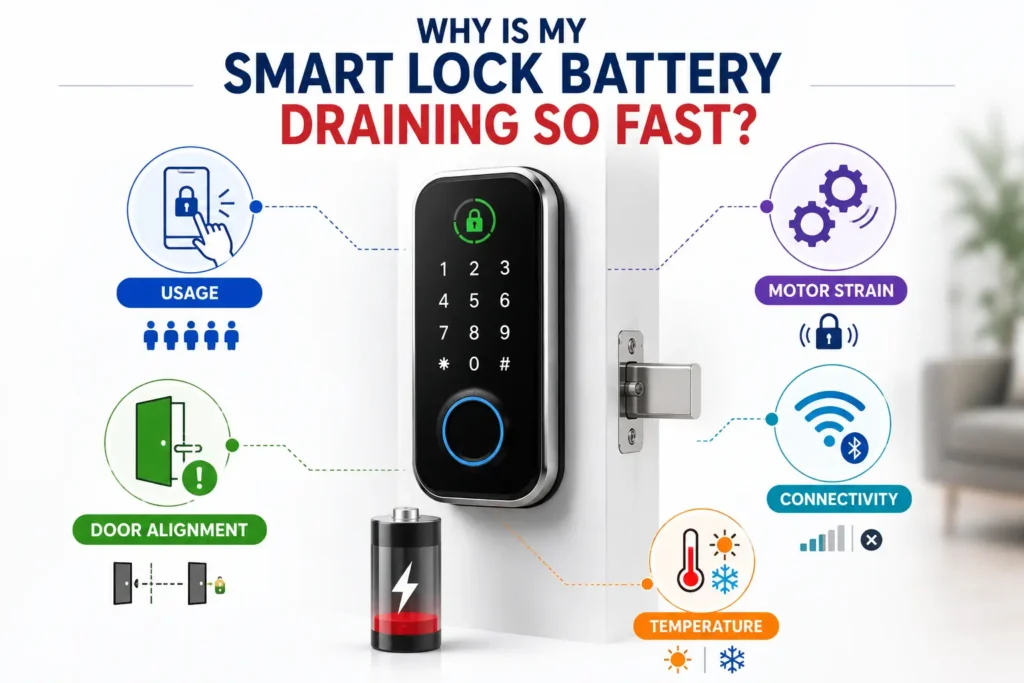
If your smart lock battery is draining quickly and lasting only a few weeks or months instead of the expected operating period, the battery itself may not be the only problem. Mechanical resistance, frequent use, connectivity, battery type, installation and environmental conditions can all contribute to faster battery drain.
Battery Dies in Weeks Instead of Months
Unexpectedly fast battery drain can have several possible causes. Start by checking the most basic factors before replacing batteries repeatedly.
- Door or deadbolt resistance: A motor may consume more power when the bolt does not move freely.
- Frequent operation: A busy entrance can use the lock far more often than a low-traffic door.
- Connectivity: Wireless communication can affect power consumption depending on the lock’s design and configuration.
- Incorrect battery type: Using batteries that do not match the manufacturer’s specification can affect performance.
- Battery condition: Old, depleted or unsuitable batteries may provide less reliable runtime.
- Software or firmware: Supported updates may address performance or operational issues.
- Installation problems: Wiring, mounting or mechanical installation issues can place additional demands on the system.
- Environmental conditions: Temperature and exposure can affect battery performance.
Check the Door Before Blaming the Battery
Before assuming that the battery is faulty, check whether the deadbolt moves smoothly. A smart lock may appear to have a battery problem when the underlying issue is door pressure, strike misalignment or excessive friction.
Pro Tip: Try the Door Alignment Test
- Keep the door open and operate the deadbolt.
- Close the door completely and operate the deadbolt again.
- Compare the movement and motor sound in both positions.
- If the bolt becomes noticeably harder to operate when the door is closed, check the door, frame and strike alignment.
A lock that operates smoothly with the door open but struggles when closed may need mechanical adjustment before you replace the battery again.
Check the Battery and Device Settings
If the mechanical operation is smooth, check the battery and device configuration. Confirm that the batteries match the manufacturer’s specified size, type and chemistry, and check whether the app reports an abnormal battery level or device status.
Also check for supported firmware and application updates, review connectivity settings where applicable, and follow the manufacturer’s troubleshooting procedure before making further changes.
When Rapid Battery Drain Needs Support
If the lock continues to drain batteries unusually quickly after the door operates smoothly and the correct batteries are installed, the issue may require manufacturer support or professional inspection.
Pay particular attention to repeated motor problems, damaged wiring, battery-compartment damage, unusual heat, or rapid drain that continues even after installing fresh, manufacturer-approved batteries.
Note: Replacing the battery repeatedly without checking the lock’s mechanical operation can hide the real cause of excessive battery drain. Check the door and deadbolt first, then investigate the battery and electronic system.
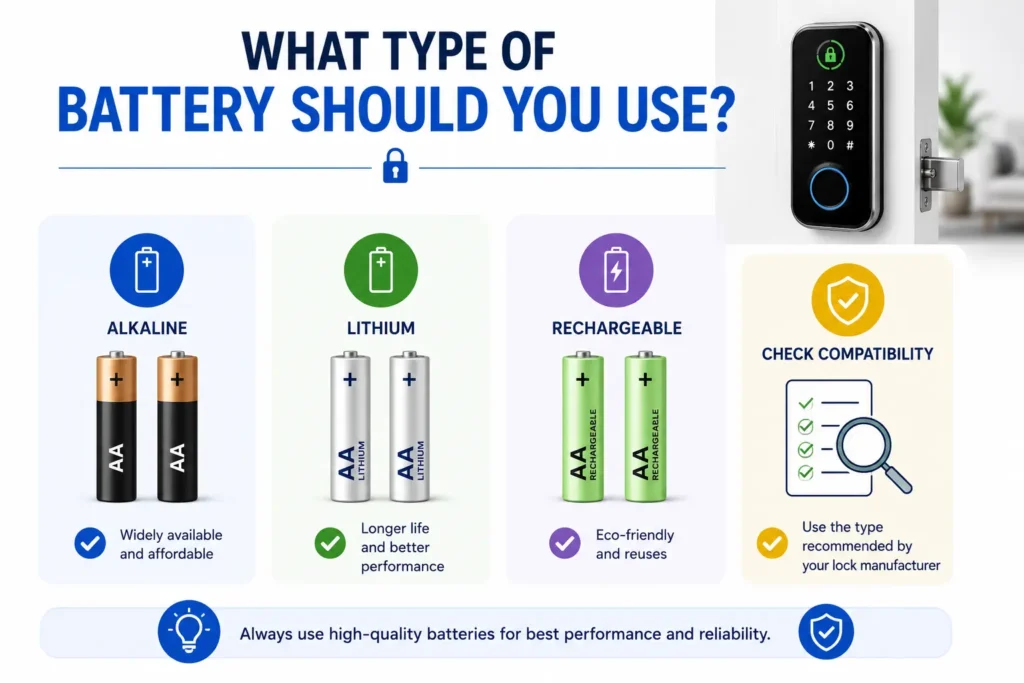
What Type of Battery Should You Use?
The correct battery depends on the smart-lock model. Different locks may use alkaline batteries, lithium batteries, rechargeable cells or a dedicated rechargeable battery pack, so always follow the manufacturer’s specification.
Choosing the correct smart lock battery is important for reliable operation and predictable battery life. Battery chemistry can affect performance under different operating conditions, so the manufacturer’s recommended battery type should always be the starting point.
Disposable vs Rechargeable Batteries
| Factor | Disposable Batteries | Rechargeable System |
|---|---|---|
| Replacement | Periodic replacement is required. | Requires recharging when depleted. |
| Convenience | Depends on battery availability and lock design. | Depends on charging access and battery design. |
| Compatibility | Must match the manufacturer’s specification. | Must be supported by the specific lock. |
| Emergency planning | Keeping compatible spare batteries can be useful. | Keep the battery charged and understand the backup procedure. |
| Best choice | Depends on the smart-lock model and manufacturer’s requirements. | |
Follow the Manufacturer’s Battery Specification
Do not assume that every smart lock supports the same battery chemistry. Check the manufacturer’s documentation for the correct battery size, chemistry, voltage and replacement procedure before installing new batteries.
Using an unsupported battery type can affect battery performance, battery-level reporting or the operation of the lock. The same applies to rechargeable batteries when the manufacturer does not specify that they are supported.
Can You Use Rechargeable Batteries in a Smart Lock?
It depends on the specific lock. Some models support rechargeable batteries or dedicated rechargeable battery packs, while others specify disposable batteries. Always confirm compatibility before using rechargeable cells.
If the manufacturer supports rechargeable batteries, follow the recommended charging method and charging interval. If the lock requires disposable batteries, use the specified type rather than substituting a different chemistry simply because it is rechargeable.
Smart Lock Battery Replacement Tips
When replacing multiple batteries, follow the manufacturer’s instructions about how they should be replaced. Avoid mixing different battery types or combining old and new batteries unless the manufacturer specifically allows it.
After replacing the batteries, test the lock and confirm that the keypad, fingerprint reader, app connection and other configured access methods operate normally.
Note: There is no universal “best battery” for every smart lock. Compatibility with the manufacturer’s specified battery type should come before assumptions about lithium, alkaline or rechargeable batteries.
How to Know When Your Smart Lock Battery Is Low
A smart lock will often provide a warning before its battery is completely depleted. Recognizing these warnings gives you time to replace or recharge the smart lock battery and verify that your backup access method is available.
Low-Battery Warning Signs
Depending on the model, a low battery may be indicated through the smart-lock app, keypad, LED indicator, voice prompt or an audible warning. Some connected locks may also send a notification to the user’s smartphone.
The exact warning level and notification method vary by manufacturer, so check the documentation for your specific lock rather than relying on a single battery percentage or warning threshold.
What to Do When the Low-Battery Warning Appears
Treat a low-battery warning as a reminder to take action, not as a signal to keep using the lock until it stops working.
- Check the battery status through the lock or its app, if available.
- Confirm the correct replacement battery type from the manufacturer’s instructions.
- Replace or recharge the battery according to the manufacturer’s procedure.
- Operate the lock and confirm that it functions normally.
- Make sure your emergency-access method is known and available.
Don’t Wait Until the Battery Is Completely Dead
Waiting until a smart lock becomes completely unresponsive can turn a simple smart lock battery replacement into an emergency-access situation. Replacing the battery after a clear warning gives you more control and reduces the chance of being caught without a working backup.
If your lock repeatedly reaches a low-battery warning much sooner than expected, investigate possible causes such as frequent use, motor strain, door alignment, connectivity or an incorrect battery type instead of simply replacing the battery again.
Key Takeaway: A low-battery warning is your opportunity to act before a complete failure. Replace or recharge the battery promptly and keep your emergency-access method ready.
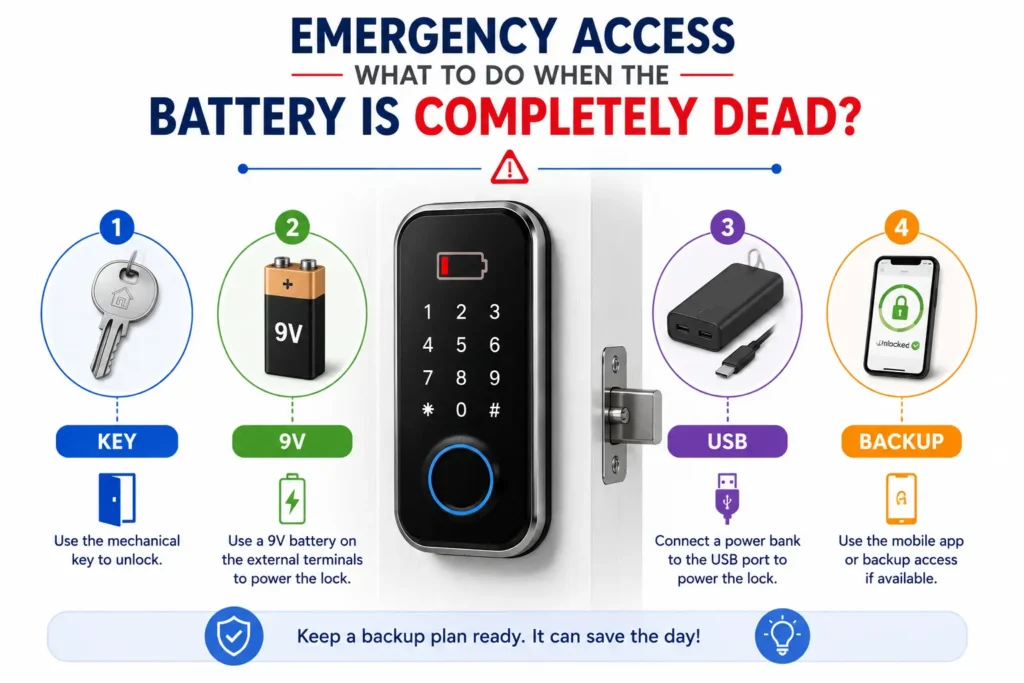
Emergency Access: What to Do When the Battery Is Completely Dead?
A completely depleted smart-lock battery does not automatically mean that you are locked out. Many smart locks provide a manufacturer-supported emergency access method, but the available option varies by model.
Before an emergency happens, check your lock’s instructions and understand which backup method it provides. Never assume that a 9V battery, USB cable or mechanical key will work unless your specific model supports it.
Method 1: Mechanical Key Override
Some smart locks include a traditional mechanical key as a backup. The keyway may be visible or hidden behind a cover, depending on the lock design.
If your lock provides this option, use the key according to the manufacturer’s instructions. Keep the backup key somewhere accessible outside the locked property, such as with an authorized person or in another secure location.
Method 2: 9V Emergency Power on Supported Locks
Some smart locks provide dedicated external power terminals that can temporarily power the lock when its internal batteries are completely depleted. On supported models, a 9V battery may be used according to the manufacturer’s instructions.
The location of the terminals and the exact unlocking procedure vary by model. Only use the designated emergency-power contacts and follow the manufacturer’s documented procedure. Do not connect a battery to unidentified contacts.
Emergency external power is intended to provide temporary power for access; it should not be treated as a replacement for the lock’s normal battery system.
Method 3: USB-C or Micro-USB Emergency Power
Some newer smart locks provide an external USB-C or Micro-USB power input that can temporarily power the lock when the internal battery is depleted.
If your model supports this method, use a compatible power source and follow the manufacturer’s instructions. The required connection, power requirements and activation procedure can differ between products.
Method 4: Other Manufacturer-Supported Backup Methods
Depending on the model, emergency access may also involve another documented backup method, such as a backup PIN, RFID/NFC credential or a dedicated emergency-access procedure.
These methods should only be considered available if they are specifically supported by the lock. Check the manufacturer’s documentation before relying on any backup access feature.
What If the Emergency Method Does Not Work?
If the documented emergency-access method does not restore access, avoid experimenting with wiring, applying power to unknown contacts or forcing the lock. Check the manufacturer’s troubleshooting instructions and contact manufacturer support or a qualified locksmith when necessary.
For a broader look at smart-lock security, authentication, privacy and potential risks, see our guide to are smart locks safe?
Note: Emergency access is model-specific. A 9V battery or USB power bank should never be assumed to work on a smart lock unless the manufacturer specifically provides and documents that emergency-power method.
Emergency Access Checklist: What Should You Keep Ready?
A smart lock is easier to manage during a battery failure when you have the correct backup method available before you need it. The exact requirements depend on the lock model, so always follow the manufacturer’s instructions.
Preparing these items in advance can reduce the risk of being locked out when a smart lock battery dies. Choose only emergency-access methods that are specifically supported by your lock.
| Backup Item | Why It Matters |
|---|---|
| Mechanical key | Provides an independent access method on supported locks. |
| Compatible spare batteries | Helps prevent avoidable battery depletion. |
| Power bank | Can provide temporary power for locks with supported USB emergency input. |
| Correct cable | May be required when the lock uses USB-C or Micro-USB emergency power. |
| Low-battery alerts | Gives you an opportunity to replace or recharge the battery before complete failure. |
| Manufacturer instructions | Confirms the correct emergency-access procedure for your specific model. |
| Accessible backup | Ensures your only backup method is not left inside the locked property. |
Pro Tip: Never keep your only emergency-access method inside the property protected by the smart lock. Make sure an appropriate backup key, emergency-power option, or other manufacturer-supported method is accessible when you need it.
How to Extend Smart Lock Battery Life
Good battery maintenance can help your smart lock operate more reliably between battery replacements. If you want to know how to extend smart lock battery life, the most effective approach is to reduce unnecessary power use while making sure the lock’s mechanical and electronic systems are working properly.
Fix Mechanical Resistance First
A smart lock should not have to fight against a stiff door or misaligned strike. Check the door alignment, deadbolt movement, strike plate and mounting hardware if the motor sounds strained or the bolt does not move smoothly.
Correcting unnecessary mechanical resistance can reduce the workload placed on the motor during each locking and unlocking cycle and may help reduce smart lock battery drain.
Reduce Unnecessary Lock Cycles
Every additional locking or unlocking cycle uses some battery power. Review features such as automatic locking and avoid repeated remote commands or unnecessary testing when they are not needed.
Maintain Reliable Connectivity
For connected smart locks, maintain a stable connection between the lock and its supported network, hub or other connected devices. Follow the manufacturer’s recommended network configuration and avoid unnecessary connectivity changes.
Keep Firmware and the App Updated
Use manufacturer-supported firmware and application updates when they are available. Updates can address security, compatibility or operational issues, while keeping the software environment supported by the manufacturer.
Replace Batteries Correctly
Always use the battery type specified by the manufacturer. When replacing batteries, follow the recommended procedure and avoid mixing different battery types or old and new batteries when the manufacturer advises against it.
Monitor Battery Performance
Keep track of how frequently the battery needs to be replaced or recharged. If your smart lock battery life becomes noticeably shorter than before, investigate the cause rather than assuming that the battery itself is defective.
Check for changes in daily usage, door alignment, motor resistance, connectivity, temperature or battery type that may have affected performance.
Note: If a smart lock continues to drain batteries unusually quickly, do not focus only on battery replacement. Check the door alignment, motor operation, connectivity, battery specification and manufacturer troubleshooting guidance.
Smart Lock Battery Life in India, UK and US
The environment where a smart lock is installed can affect smart lock battery life. However, there is no single battery-life figure that applies to every country because temperature, installation conditions, usage and the specific lock model all vary.
India: Heat, Humidity and Emergency Planning
In India, smart locks may be exposed to high temperatures, humidity and seasonal weather changes, particularly when installed on exterior doors. These conditions can affect battery performance depending on the battery type and the manufacturer’s specified operating range.
For homes where the main entrance is frequently used, it is practical to keep the manufacturer’s recommended replacement batteries available and understand the lock’s emergency-access procedure before the battery becomes completely depleted.
UK: Cold Weather and Door Conditions
Lower temperatures can affect battery performance, while changes in the door or frame can also influence how easily the locking mechanism operates. If a smart lock becomes harder to operate during colder periods, check the door alignment and deadbolt movement as well as the battery condition.
Outdoor or exposed installations should follow the manufacturer’s recommended environmental and operating conditions for the specific lock.
US: Climate and Model Variation
Smart locks in the US can operate in a wide range of climates, from cold northern regions to hot and humid areas. Battery performance can therefore vary significantly between installations even when the same lock model is used.
Rather than assuming a country-specific battery life, check the manufacturer’s operating-temperature range, battery specification and recommended installation conditions for your location.
Does Climate Affect Smart Lock Battery Life?
Yes, environmental conditions can influence how batteries perform, but climate is only one part of the equation. Daily usage, motor strain, door alignment, connectivity, battery chemistry and the lock’s design can also affect how long the battery lasts.
This is why the same smart lock may provide different real-world battery performance in different homes, even when the model and battery type are identical.
Note: Climate can influence battery performance, but location alone does not determine battery life. Usage, mechanical resistance, connectivity, battery type and the specific smart-lock design also matter.
Smart Lock Battery Life vs Emergency Access: What Should You Check Before Buying?
Battery life is important when choosing a smart lock, but it should not be the only consideration. A good smart lock should also provide a clear low-battery warning and a reliable, manufacturer-supported way to regain access if the battery becomes completely depleted.
When comparing smart lock battery life, look at both expected runtime and what happens when the battery is low or completely dead. A longer-lasting battery is useful, but a reliable smart lock emergency access method can be just as important.
| Feature | Why It Matters |
|---|---|
| Published battery estimate | Helps you understand the expected operating period. |
| Test conditions | Makes it easier to understand what the advertised battery figure represents. |
| Low-battery warning | Gives you time to replace or recharge the battery before complete depletion. |
| Emergency power | Can provide temporary power on models that support an external emergency-power method. |
| Mechanical key | Provides an independent backup method on supported locks. |
| Replaceable battery | Can make long-term battery maintenance easier. |
| Battery availability | Important when replacement batteries are needed quickly. |
| Battery specification | Helps ensure that you use the correct battery type for the lock. |
| Offline operation | Shows which functions may remain available when internet or cloud connectivity is unavailable. |
| Smooth mechanical operation | Reduces unnecessary motor strain during locking and unlocking. |
Battery Life Is Not the Only Buying Factor
A smart lock advertised with a long battery runtime may not be the best choice for every home. Consider daily usage, battery type, connectivity, motor load, door alignment and the manufacturer’s recommended operating conditions. If you’re comparing the overall benefits and limitations of different lock types, see our guide to smart lock vs traditional lock.
Also check how the lock handles a low battery or completely dead battery. A clear warning system and a documented emergency-access procedure can make battery maintenance much easier.
Check the Emergency Access Method Before Buying
Before choosing a smart lock, confirm whether it provides a mechanical key, 9V emergency power, USB emergency power or another manufacturer-supported backup method. Do not assume that every smart lock supports the same emergency-access option.
The emergency procedure should also be practical for your installation. If the backup method requires a specific battery, cable or external power source, make sure you know what is required before the lock is installed.
Key Takeaway: When comparing smart locks, look beyond the advertised battery life. A strong choice combines predictable battery performance, clear warnings, smooth mechanical operation and a reliable emergency-access method.
Smart Lock Battery Maintenance Checklist
Regular battery and lock maintenance can help reduce unexpected failures and keep your smart lock operating reliably. Use this checklist to review the most important battery, mechanical and emergency-access points.
| Check | Recommended Action |
|---|---|
| Battery level | Check the battery status when the lock provides a low-battery warning. |
| Low-battery alerts | Keep available notifications or warnings enabled where supported. |
| Door alignment | Check the door and strike if the bolt becomes harder to operate. |
| Deadbolt movement | Make sure the bolt moves smoothly without excessive resistance. |
| Battery type | Use the battery size and chemistry specified by the manufacturer. |
| Spare batteries | Keep compatible replacement batteries available when practical. |
| Emergency power | Know the exact manufacturer-supported emergency-power method for your model. |
| Backup key | Keep the key accessible outside the locked property if your lock provides one. |
| Firmware and app | Install manufacturer-supported updates and follow the recommended procedures. |
| Battery compartment | Inspect for visible damage, corrosion or other signs of a problem. |
Key Takeaway: Good smart-lock maintenance is not just about replacing batteries. Regularly check the battery condition, door alignment, deadbolt movement, software and emergency-access method to reduce the risk of unexpected failure.
Frequently Asked Questions
How long do smart lock batteries usually last?
Many smart locks are designed to operate for several months, with some models rated around 6–12 months or more. Actual battery life depends on usage, connectivity, door resistance, battery type and environmental conditions.
Why is my smart lock battery draining so quickly?
Fast battery drain can be caused by frequent use, door or deadbolt resistance, connectivity, incorrect batteries, installation issues or environmental conditions. Check the mechanical operation before repeatedly replacing the battery.
Does Wi-Fi make smart lock batteries drain faster?
Wi-Fi can affect battery consumption because wireless communication requires power. However, the actual impact depends on the lock’s hardware, software and connectivity design.
Can a smart lock work after its battery dies?
Some smart locks provide a manufacturer-supported emergency access method, such as a mechanical key or external emergency power. The available method varies by model.
How do you unlock a smart lock with a dead battery?
Use the emergency-access method specified by the manufacturer. Depending on the model, this may include a mechanical key, 9V emergency power, USB-C or another supported backup method.
Can you use a 9V battery to open a smart lock?
Only some smart locks support 9V emergency power through dedicated terminals. Never connect a 9V battery to unidentified contacts. Follow the manufacturer’s instructions for your exact model.
Can you use rechargeable batteries in a smart lock?
It depends on the specific lock. Some models support rechargeable batteries or dedicated rechargeable packs, while others specify disposable batteries. Always follow the manufacturer’s battery requirements.
Can a misaligned door drain a smart lock battery?
Yes. If a misaligned door or strike creates resistance, the motor may need to work harder to move the deadbolt. Checking the door alignment can therefore be an important step when investigating unusually fast battery drain.
Final Takeaway: Smart lock battery life depends on more than the battery itself. Usage, motor strain, door alignment, connectivity, battery type, temperature and maintenance can all affect how long a lock operates between replacements.
If you are wondering what to do when a smart lock battery dies, do not wait until the lock becomes completely unresponsive. Pay attention to low-battery warnings, use the correct replacement or rechargeable battery, and understand your lock’s manufacturer-supported emergency access method before you need it.